Legacy example · C++ · Python · Version 1.0
Ultrasound Bone Scoliosis Segmentation
| Authors | Holoscan Team (NVIDIA) |
|---|---|
| Supported platforms | x86_64, aarch64 |
| Language | C++, Python |
| Version | 1.0 |
| Compatibility | HSDK 4.6 |
| Contribution level | Level 1 · Very high-quality code |
| Source | HoloHub |
Legacy HoloHub application
This application comes from HoloHub and was last tested with Holoscan SDK (HSDK) 4.6. It runs with the HoloHub CLI, ./holohub.
This section describes the details of the ultrasound segmentation sample application as well as how to load a custom inference model into the application for some limited customization. Out of the box, the ultrasound segmentation application comes as a "video replayer" and "AJA source", where the user can replay a pre-recorded ultrasound video file included in the holoscan container or stream data from an AJA capture device directly through the GPU respectively.
This application performs an automatic segmentation of the spine from a trained AI model for the purpose of scoliosis visualization and measurement.
This application is available in C++ and Python API variants.
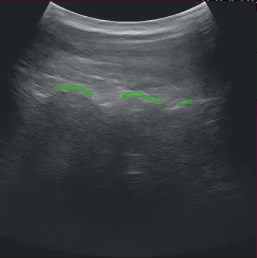
Fig. 1 Spine segmentation of ultrasound data (NGC Resource)
Video Stream Replayer Input
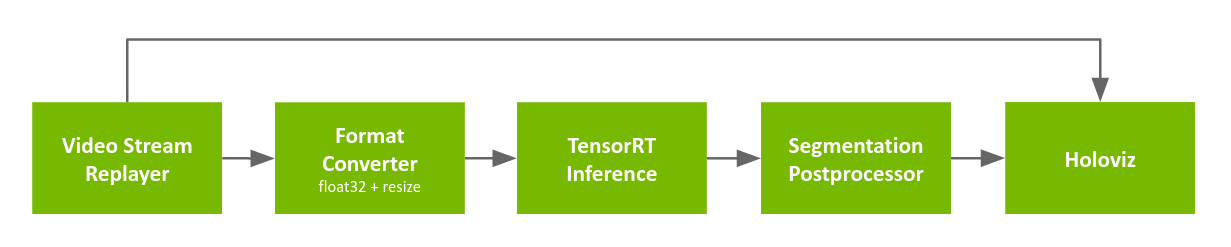
Fig. 2 Segmentation application workflow with replay from file
The pipeline uses a recorded ultrasound video file (generated by convert_video_to_gxf_entities script) for input frames. Each input frame in the file is loaded by Video Stream Replayer and passed to the following two branches:
- In the first branch, the input frames are directly passed to Holoviz for rendering in the background.
- In the second branch, the frames go through the Format Converter to convert the data type of the image from
uint8tofloat32and resize the image before it is fed into the segmentation model using TensorRT Inference. The result is then ingested by the Segmentation Postprocessor which extracts the masks from the inference output, before Holoviz renders them as overlays.
AJA Card input

Fig. 3 Segmentation application workflow with input from AJA video source
The pipeline is similar to the one using the recorded video, with the exceptions below:
- the input source is replaced with AJA Source (pixel format is
RGBA8888with a resolution of 1920x1080) - a Format Converter is added in the inference pipeline to convert from
RGBA8888(note: could have updated the configuration of the next Format Converter when using AJA instead of adding another operator in the pipeline)
Holoscan SDK version
Ultrasound segmentation application in HoloHub required version 0.6 of the Holoscan SDK. If the Holoscan SDK version is 0.5 or lower, following code changes must be made in the application:
- In cpp/main.cpp:
#include <holoscan/operators/inference/inference.hpp>is replaced with#include <holoscan/operators/multiai_inference/multiai_inference.hpp> - In cpp/main.cpp:
ops::InferenceOpis replaced withops::MultiAIInferenceOp - In cpp/CMakeLists.txt: update the holoscan SDK version from
0.6to0.5 - In cpp/CMakeLists.txt:
holoscan::ops::inferenceis replaced withholoscan::ops::multiai_inference - In python/CMakeLists.txt: update the holoscan SDK version from
0.6to0.5 - In python/multiai_ultrasound.py:
InferenceOpis replaced withMultiAIInferenceOp