Legacy example · Python · Version 0.2.0
G-SHARP: Gaussian Splatting for Holographic Anatomical Reconstruction Pipeline
Real-time surgical scene reconstruction using Gaussian Splatting: DA2 depth, MedSAM3 segmentation, VGGT poses, and GSplat training in a five-phase pipeline.
| Authors | Holoscan Team (NVIDIA) |
|---|---|
| Supported platforms | x86_64 |
| Language | Python |
| Version | 0.2.0 |
| Compatibility | HSDK 3.8 |
| Contribution level | Level 2 · Quality code |
| Source | HoloHub |
Legacy HoloHub application
This application comes from HoloHub and was last tested with Holoscan SDK (HSDK) 3.8. It runs with the HoloHub CLI, ./holohub.
This application demonstrates real-time 3D surgical scene reconstruction by combining Holoscan SDK for high-performance streaming, 3D Gaussian Splatting for neural 3D representation, and temporal deformation networks for accurate modeling of dynamic tissue.
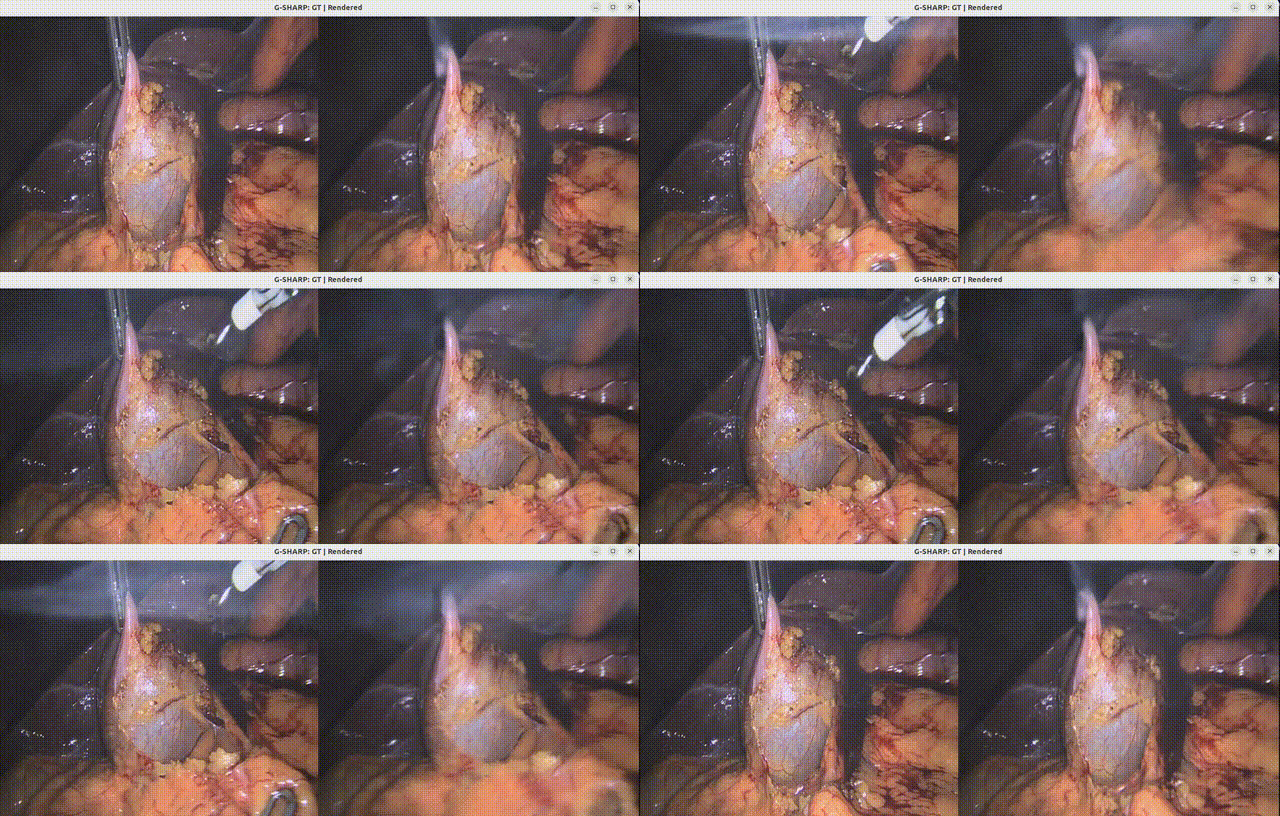
The application provides a complete end-to-end pipeline — from raw surgical video frames to real-time 3D reconstruction — with no manual preprocessing. Researchers and developers can use it to train custom models on their own endoscopic data and visualize results with GPU-accelerated rendering.
Features of this application include:
- Fully Automated Pipeline: Five-phase pipeline (depth, segmentation, poses, training, rendering) with zero manual preprocessing
- Real-time Visualization: Stream reconstructed scenes at >30 FPS using Holoscan HoloViz
- High-Quality Reconstruction: Achieves 35+ dB PSNR with ~50,000 Gaussians on surgical video
- Temporal Deformation: Per-frame tissue modeling captures dynamic deformation over time
- Tool Segmentation: MedSAM3-based tool masks automatically exclude instruments from reconstruction
- Auto-Download: Sample data and all model checkpoints download automatically on first build
It takes input from a directory of sequential PNG frames (e.g., endoscopic video). It processes the input through DA2 depth estimation, MedSAM3 segmentation, VGGT camera pose estimation, and GSplat training. And it outputs a real-time 3D Gaussian Splatting reconstruction with temporal deformation.
It is ideal for use cases such as:
- Surgical scene understanding and visualization
- Tool-free tissue reconstruction for analysis
- Research in surgical vision and 3D reconstruction
- Development of real-time surgical guidance systems
Quick Start
Step 1: Clone the HoloHub Repository
git clone https://github.com/nvidia-holoscan/holohub.git
cd holohub
Step 2: Read and Agree to the Terms and Conditions of the EndoNeRF Sample Dataset
- Read and agree to the Terms and Conditions for the EndoNeRF dataset.
- The EndoNeRF sample dataset, DA2 checkpoint, and MedSAM3 checkpoint are downloaded automatically when building the application.
- Optionally, for manual download of the dataset, refer to the Data section below.
-
Optionally, if you do not agree to the terms and conditions, set the
HOLOHUB_DOWNLOAD_DATASETSenvironment variable toOFFand manually download the dataset and place it in the correct location by following the instructions in the Data section below.export HOLOHUB_DOWNLOAD_DATASETS=OFF
Step 3: Run the Full Pipeline
To run the complete pipeline (depth + segmentation + poses + training + live viewer):
./holohub run surgical_scene_recon full
The first run builds the Docker container and downloads all data and checkpoints automatically. This may take several minutes.
Step 4: View Results
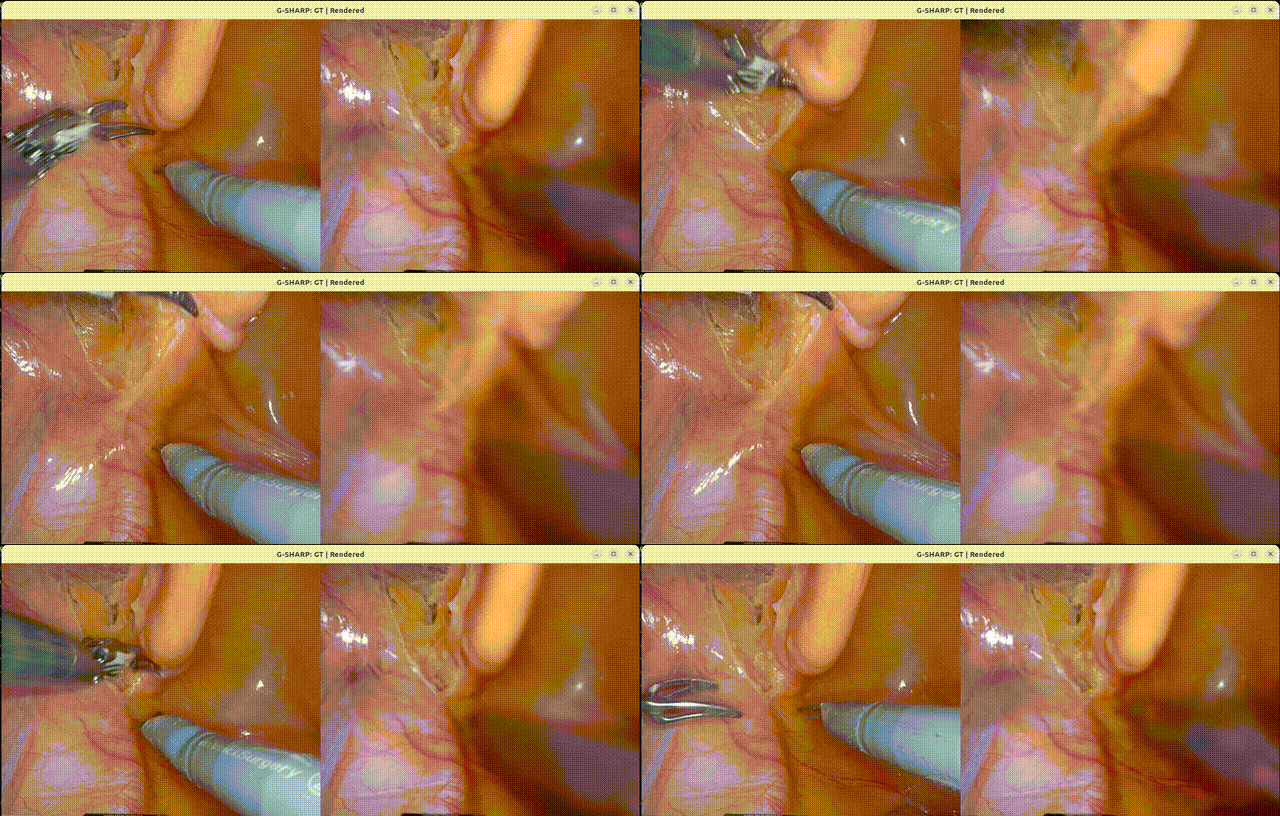
After training completes, the live render viewer opens automatically, showing side-by-side ground truth and reconstructed frames at 30 FPS. Close the window to exit.
To re-render from existing training output without re-training:
./holohub run surgical_scene_recon render
Pipeline Overview
G-SHARP runs five sequential phases to reconstruct a 3D scene from surgical video frames:
| Phase | Component | Framework | Description |
|---|---|---|---|
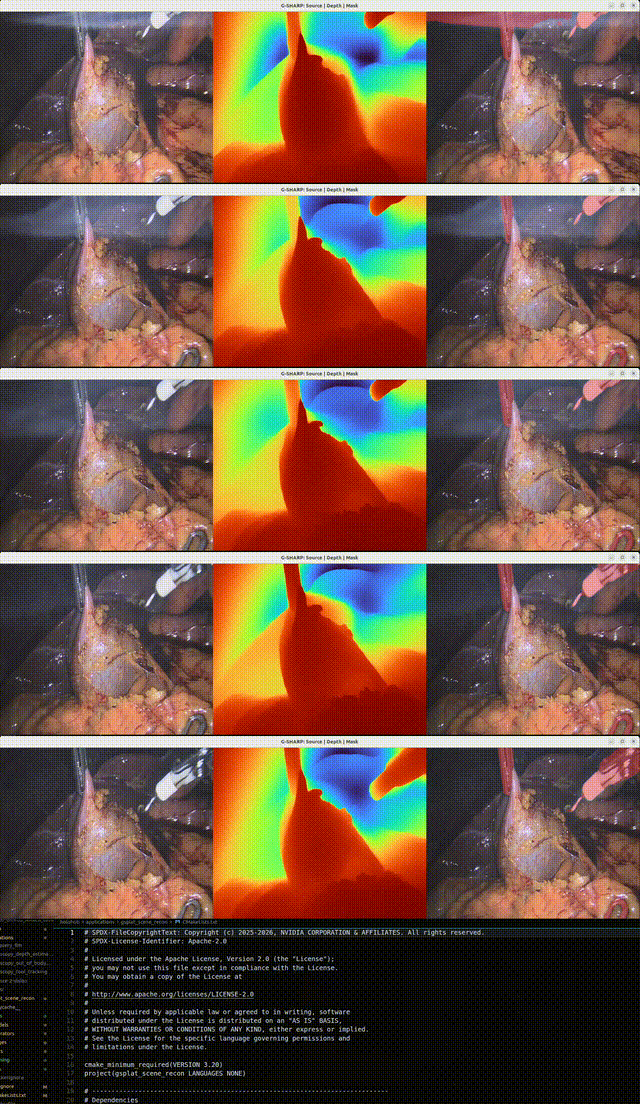
| 1 | DA2 depth + MedSAM3 segmentation | Holoscan streaming | Dense monocular depth estimation and surgical tool segmentation |
| 2 | VGGT camera pose estimation | Standalone PyTorch | Batch camera extrinsic and intrinsic estimation |
| 3 | EndoNeRF format assembly | Python script | Assembles depth, masks, and poses into training-ready format |
| 4 | GSplat training with deformation network | Standalone PyTorch | Two-stage Gaussian Splatting: coarse (static) then fine (deformation) |
| 5 | Live render viewer | Holoscan streaming | Real-time side-by-side GT vs rendered visualization |
Phase 1: DA2 Depth + MedSAM3 Segmentation
Phase 1 runs as a Holoscan streaming application. Each frame passes through Depth Anything V2 for dense monocular depth and MedSAM3 for surgical tool segmentation, all in a single streaming pass.
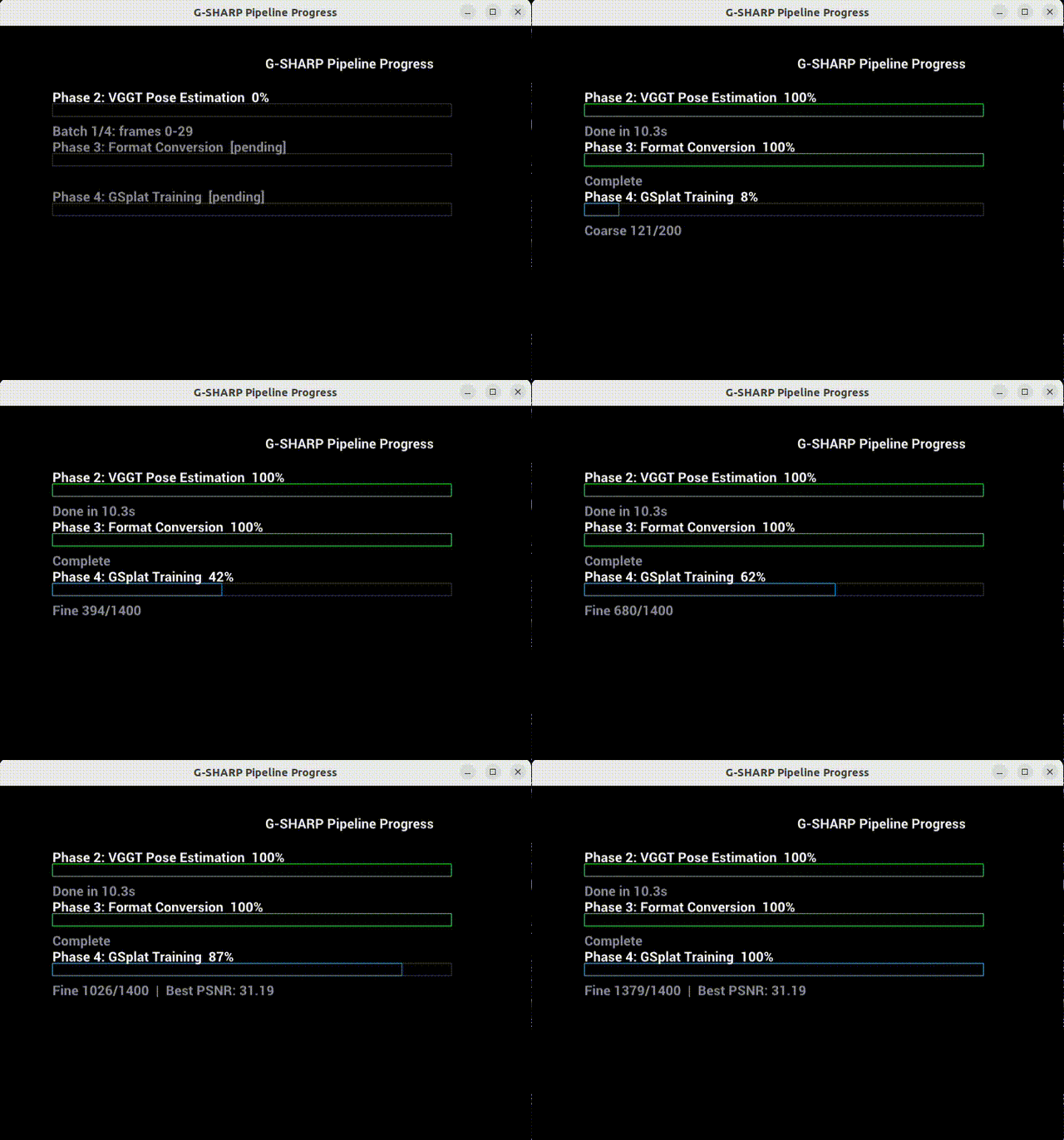
Pipeline Progress Monitor
The pipeline reports progress through a live monitor window:
Run Modes
All commands are from the HoloHub repo root:
| Mode | Command | Description |
|---|---|---|
| Full pipeline | ./holohub run surgical_scene_recon full |
All five phases: DA2+MedSAM3 → VGGT → EndoNeRF → training → live viewer. |
| Train only | ./holohub run surgical_scene_recon train |
Phases 1–4 (no viewer; exits after training). |
| Render only | ./holohub run surgical_scene_recon render |
Phase 5 only (live viewer on existing output). |
| Verify train | ./holohub run surgical_scene_recon verify_train |
Short run for CI/testing: 20 training iters, 5 coarse, no viewer, headless. |
Examples:
# Full pipeline with live viewer (requires display)
./holohub run surgical_scene_recon full

# Train only, then later run the viewer
./holohub run surgical_scene_recon train
./holohub run surgical_scene_recon render

# Quick sanity check (no display needed)
./holohub run surgical_scene_recon verify_train
To pass extra arguments to the app (e.g. more iterations), use --run-args:
./holohub run surgical_scene_recon full --run-args="--training-iterations 7000 --coarse-iterations 1000"
Data
Automatic Download (Default)
All data and checkpoints are downloaded automatically on first build:
| Asset | Source | License | Size |
|---|---|---|---|
| EndoNeRF "pulling" frames (50 images) | Google Drive | Terms | ~20 MB |
| Depth Anything V2 (Small) | HuggingFace | Apache-2.0 | ~95 MB |
| MedSAM3 checkpoint | HuggingFace | MIT | ~9.3 GB |
The application downloads the EndoNeRF "pulling" dataset by default, providing a ready-to-run experience out of the box.
Dataset Layout
<HOLOHUB_ROOT>/data/surgical_scene_recon/
├── frames/          ← PNG images (downloaded or your own)
├── da2/depth_anything_v2_vits.pth
└── medsam3/checkpoint.pt
Using Your Own Data
To use your own surgical video frames instead of the default EndoNeRF dataset:
- Place your PNG frames in
data/surgical_scene_recon/frames/. Filenames should sort alphabetically in temporal order (e.g.,frame-000000.color.png,frame-000001.color.png, ...). - Checkpoints (DA2 and MedSAM3) are downloaded automatically. If they already exist on disk, the download is skipped.
mkdir -p data/surgical_scene_recon/frames
cp /path/to/your/*.png data/surgical_scene_recon/frames/
Manual Download
To skip automatic downloads and supply your own data manually:
export HOLOHUB_DOWNLOAD_DATASETS=OFF
mkdir -p data/surgical_scene_recon/frames data/surgical_scene_recon/da2 data/surgical_scene_recon/medsam3
cp /path/to/your/*.png data/surgical_scene_recon/frames/
wget -O data/surgical_scene_recon/da2/depth_anything_v2_vits.pth \
  https://huggingface.co/depth-anything/Depth-Anything-V2-Small/resolve/main/depth_anything_v2_vits.pth
# Download MedSAM3 checkpoint (~9.3 GB) from https://huggingface.co/ChongCong/Medical-SAM3
Automatically managed (do not place in your data dir): VGGT-1B is downloaded from HuggingFace on first run (cache at ~/.cache/huggingface). VGG-16 for LPIPS is pre-cached in the Docker image at build time.
Models Used by the surgical_scene_recon Application
The surgical_scene_recon application uses a five-model pipeline:
| Model | Purpose | License |
|---|---|---|
| Depth Anything V2 (Small) | Dense monocular depth estimation | Apache-2.0 |
| MedSAM3 | Surgical tool segmentation | MIT |
| VGGT-1B | Camera pose estimation (extrinsics + intrinsics) | Meta License |
| 4D Gaussian Splatting | Neural 3D scene representation | MIT / Apache-2.0 |
| HexPlane Deformation Network | Temporal tissue deformation modeling | MIT / Apache-2.0 |
Gaussian Splatting Model
- Architecture: 3D Gaussians with learned position, scale, rotation, opacity, and color
- Initialization: Multi-frame point cloud (~30,000–50,000 points)
- Renderer:
gsplatlibrary (CUDA-accelerated differentiable rasterization) - Spherical Harmonics degree 3 (16 coefficients per Gaussian for view-dependent color)
Temporal Deformation Network
- Architecture: HexPlane 4D spatiotemporal grid + MLP decoder
- Input: 3D position + normalized time value [0, 1]
- Output: Deformed position, scale, rotation, and opacity per Gaussian
- Training: Two-stage (coarse: static base, fine: with deformation)
About the Model Training Process
The application trains in two stages:
- Coarse Stage — learns the base static Gaussian model without deformation.
- Fine Stage — adds the temporal deformation network for dynamic tissue modeling.
The training uses:
- Multi-modal Data: RGB images, depth maps, tool segmentation masks
- Loss Functions: RGB loss, depth loss, TV loss, masking losses
- Optimization: Adam optimizer with batch-size scaled learning rates
- Tool Removal: Segmentation masks applied during training for tissue-only reconstruction
Training outputs are saved to <output-dir>/phase4_training/trained_model/:
ckpts/fine_best_psnr.pt— Best checkpoint (use for rendering)ckpts/fine_step00XXX.pt— Regular step checkpointsrenders/— Saved render frames
Performance
Tested Configuration:
- GPU: NVIDIA RTX 6000 Ada Generation
- Container: Holoscan SDK 4.0.0
Pipeline Timing
| Phase | Description | Time |
|---|---|---|
| Phase 1 | DA2 + MedSAM3 streaming inference | ~24 s (63 frames) |
| Phase 2 | VGGT batch pose estimation | ~15 s |
| Phase 3 | EndoNeRF format conversion | ~1.5 s |
| Phase 4 | GSplat training (1400 iter) | ~2.5 min |
| Phase 5 | Live render viewer | Real-time |
| Total | End-to-end (63 frames) | ~3.5 min |
Quality Metrics
| Metric | Value |
|---|---|
| PSNR | 35–38 dB |
| Rendering FPS | >30 FPS (real-time) |
| Gaussians | ~35,000–65,000 splats |
| Training iterations | 1400 (200 coarse + 1200 fine) |
EndoNeRF "Pulling" Dataset Results
The default EndoNeRF "pulling" dataset (50 frames, 640×512) provides a ready-to-run benchmark:
Output Structure
After a full run, <output-dir>/ contains:
<output-dir>/
├── phase1_raw/
│   ├── images/          # Resized input frames
│   ├── depth/           # DA2 depth maps (*.npy)
│   └── masks/           # MedSAM3 segmentation masks (*.png)
├── phase2_vggt/
│   ├── poses.npy        # Camera extrinsics (4x4 matrices)
│   └── intrinsics.npy   # Camera intrinsics
├── phase3_endonerf/
│   ├── images/          # Final frames in EndoNeRF layout
│   ├── depth/           # Scaled depth maps
│   ├── masks/           # Binary masks
│   └── poses_bounds.npy # LLFF-format camera parameters
├── phase4_training/
│   └── trained_model/
│       └── ckpts/
│           ├── fine_best_psnr.pt   # Best checkpoint by PSNR
│           └── fine_step*.pt       # Step checkpoints
└── progress.json        # Live progress (updated during run)
Requirements
Hardware
- NVIDIA GPU with CUDA 12+ and Vulkan support (tested on RTX 6000 Ada)
- ~30 GB free disk space for Docker containers
- Display configured for X11 (for Phase 1 / Phase 5 visualization)
Software
- Docker with NVIDIA Container Toolkit
- Holoscan SDK 3.8.0 or later (automatically provided in containers)
Application Integration Testing
We provide integration tests.
To test the application, run:
./holohub test surgical_scene_recon --verbose
Run a single test by name:
./holohub test surgical_scene_recon --ctest-options="-R surgical_scene_recon_test_all_imports -VV"
Command Line Arguments
| Argument | Description | Default |
|---|---|---|
--data-dir |
Directory containing input PNG frames | Required |
--output-dir |
Base output directory for all pipeline artifacts | Required |
--training-iterations |
Total GSplat training iterations | 1400 |
--coarse-iterations |
Coarse stage iterations (fixed camera) | 200 |
--no-deformation |
Disable deformation network (static scene) | False |
--batch-size |
VGGT batch size (frames per batch) | 30 |
--depth-scale |
Depth scale factor (100 = centimeters) | 100.0 |
--fps |
Render viewer playback FPS | 30 |
--headless |
Run Holoscan apps without visualization | False |
--skip-phase1 |
Skip Phase 1 (reuse existing depth/masks) | False |
--skip-phase2 |
Skip Phase 2 (reuse existing VGGT poses) | False |
--skip-phase3 |
Skip Phase 3 (reuse existing EndoNeRF data) | False |
--skip-training |
Skip Phase 4 (no training) | False |
--skip-viewer |
Skip Phase 5 (no live viewer) | False |
--da2-checkpoint |
DA2 .pth checkpoint |
Auto (data dir) |
--da2-encoder |
DA2 encoder variant (vits, vitb, vitl) |
vits |
--sam3-checkpoint |
MedSAM3 .pt checkpoint |
Auto (data dir) |
Incremental Runs
Use --skip-* flags to re-run only specific phases. For example, to re-train with more iterations while reusing Phase 1–3 output:
./holohub run surgical_scene_recon full --run-args="--skip-phase1 --skip-phase2 --skip-phase3 --training-iterations 7000 --coarse-iterations 1000"
Troubleshooting
Problem: "FileNotFoundError: No PNG files found"
- Cause: Frames not in the correct location
- Solution: Ensure PNG frames are in
data/surgical_scene_recon/frames/ - Verify:
ls data/surgical_scene_recon/frames/*.png | head
Problem: "Unable to find image holohub-surgical_scene_recon"
- Cause: Container not built yet
- Solution: Remove
--no-docker-buildflag (let CLI build automatically) - Or: Manually build:
./holohub build-container surgical_scene_recon
Problem: Holoviz window doesn't appear
- Cause: X11 forwarding not enabled
- Solution: Run
xhost +local:dockerbefore running - Verify: Check
echo $DISPLAYshows a value
Problem: GPU out of memory
- Cause: Another process using GPU memory
- Solution: Check
nvidia-smiand stop other processes - Or: Reduce training batch or frame count
Problem: MedSAM3 checkpoint download fails or is 0 bytes
- Cause: Network issue or HuggingFace rate limiting
- Solution: Manually download from ChongCong/Medical-SAM3 and place at
data/surgical_scene_recon/medsam3/checkpoint.pt - Verify:
ls -lh data/surgical_scene_recon/medsam3/checkpoint.pt(should be ~9.3 GB)
Problem: Google Drive data download fails
- Cause: Google Drive rate limiting for automated downloads
- Solution: Download the EndoNeRF "pulling" images manually from Google Drive and place them in
data/surgical_scene_recon/frames/
Acknowledgements
Citation
If you use this work, please cite the following:
- G-SHARP:
@article{nath2025g,
  title={G-SHARP: Gaussian Surgical Hardware Accelerated Real-time Pipeline},
  author={Nath, Vishwesh and Tejero, Javier G and Li, Ruilong and Filicori, Filippo and Azizian, Mahdi and Huver, Sean D},
  journal={arXiv preprint arXiv:2512.02482},
  year={2025}
}
- EndoNeRF:
@inproceedings{wang2022endonerf,
  title={EndoNeRF: Neural Rendering for Stereo 3D Reconstruction of Deformable Tissues in Robotic Surgery},
  author={Wang, Yuehao and Yifan, Wang and Tao, Rui and others},
  booktitle={MICCAI},
  year={2022}
}
- 3D Gaussian Splatting:
@article{kerbl20233d,
  title={3d gaussian splatting for real-time radiance field rendering},
  author={Kerbl, Bernhard and Kopanas, Georgios and Leimk{\"u}hler, Thomas and Drettakis, George},
  journal={ACM Transactions on Graphics},
  year={2023}
}
gsplatLibrary:
@software{ye2024gsplat,
  title={gsplat},
  author={Ye, Vickie and Turkulainen, Matias and others},
  year={2024},
  url={https://github.com/nerfstudio-project/gsplat}
}
Third-Party Dependencies and Licenses
This application uses several third-party libraries. By building and running this application, you acknowledge and accept the license terms of these libraries.
VGGT (Visual Geometry Grounded Transformer)
- Source: https://github.com/facebookresearch/vggt
- License: Meta License (see repository for license terms)
- Installation: Pip-installed from source at Docker build time
- Model weights:
facebook/VGGT-1Bfrom HuggingFace
Important: The VGGT code and model weights are released under a custom Meta license. By using VGGT, you agree to be bound by its terms. The
facebook/VGGT-1Bcheckpoint is licensed for non-commercial use only. A separatefacebook/VGGT-1B-Commercialcheckpoint is available for commercial use — see the VGGT repository for details.
SAM3 (Segment Anything Model 3)
- Source: https://github.com/facebookresearch/sam3
- License: SAM License
- Installation: Pip-installed from source at Docker build time
Important: SAM3 is released under a custom SAM License. By using SAM3, you agree to be bound by its terms. A MedSAM3 checkpoint suitable for this pipeline can be downloaded from ChongCong/Medical-SAM3 on Hugging Face.
Depth Anything V2
- Source: https://github.com/DepthAnything/Depth-Anything-V2
- License: Apache-2.0 (code and Small model)
- Bundled:
models/depth_anything_v2/
The Small model (
depth_anything_v2_vits.pth) used by this application is Apache-2.0 licensed. Base/Large/Giant models are CC-BY-NC-4.0.
EndoGaussian / GSplat Training
- Source: Derived from EndoGaussian
- License: MIT (upstream EndoGaussian) + Apache-2.0 (NVIDIA modifications)
- Bundled:
training/
The bundled training code is a custom derivative that replaces the original CUDA rasterizer with the
gsplatlibrary. It is not a direct copy of the upstream repository.
Additional Python Libraries
| Library | License | URL |
|---|---|---|
| PyTorch | BSD-3-Clause | https://github.com/pytorch/pytorch |
| CuPy | MIT | https://github.com/cupy/cupy |
| gsplat | Apache-2.0 | https://github.com/nerfstudio-project/gsplat |
| LPIPS | BSD-2-Clause | https://github.com/richzhang/PerceptualSimilarity |
| HuggingFace Hub | Apache-2.0 | https://github.com/huggingface/huggingface_hub |
| einops | MIT | https://github.com/arogozhnikov/einops |
| timm | Apache-2.0 | https://github.com/huggingface/pytorch-image-models |
License
This application is licensed under Apache 2.0. See individual files for specific licensing:
- Application code: Apache 2.0 (NVIDIA)
- Training utilities: MIT License (EndoGaussian Project)
- Spherical harmonics utils: BSD-2-Clause (PlenOctree)