Legacy example · C++ · Version 1.0.0
Qt Video Replayer
| Authors | Holoscan Team (NVIDIA) |
|---|---|
| Supported platforms | x86_64, aarch64 |
| Language | C++ |
| Version | 1.0.0 |
| Compatibility | HSDK 0.6 |
| Contribution level | Level 1 · Very high-quality code |
| Source | HoloHub |
Legacy HoloHub application
This application comes from HoloHub and was last tested with Holoscan SDK (HSDK) 0.6. It runs with the HoloHub CLI, ./holohub.
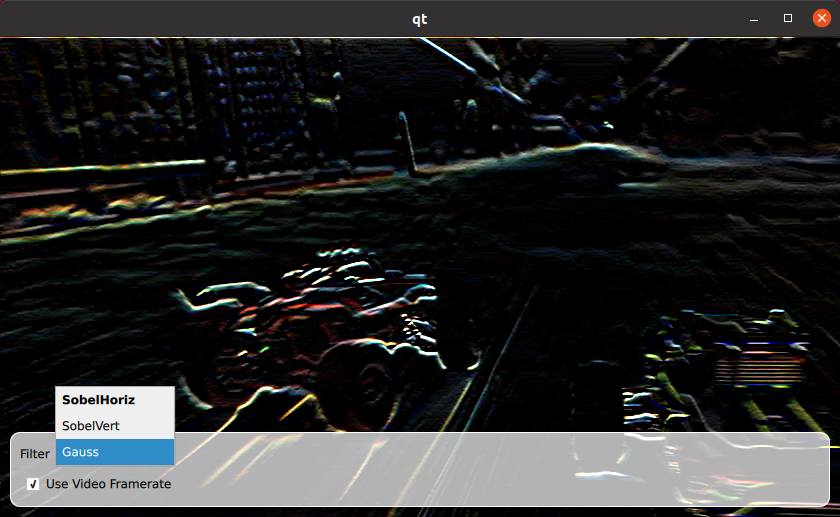
This application demonstrates how to integrate Holoscan with a Qt application. It support displaying the video frames output by a Holoscan operator and changing operator properties using Qt UI elements.
flowchart LR
    subgraph Holoscan application
        A[(VideoFile)] --> VideostreamReplayerOp
        VideostreamReplayerOp --> FormatConverterOp
        FormatConverterOp --> NppFilterOp
        NppFilterOp --> QtVideoOp
    end
    subgraph Qt Window
        QtVideoOp <-.-> QtHoloscanVideo
    end
The application uses the VideostreamReplayerOp to read from a file on disk, the FormatConverterOp to convert the frames from RGB to RGBA, the NppFilterOp to apply a filter to the frame and the QtVideoOp operator to display the video stream in a Qt window.
The QtHoloscanApp class, which extends the holoscan::Application class, is used to expose parameters of Holoscan operators as Qt properties.
For example the application uses a QML Checkbox is used the set the realtime property of the VideostreamReplayerOp operator.
    CheckBox {
        id: realtime
        text: "Use Video Framerate"
        checked: holoscanApp.realtime
        onCheckedChanged: {
            holoscanApp.realtime = checked;
        }
    }
The QtHoloscanVideo is a QQuickItem which can be use in the QML file. Multiple QtHoloscanVideo items can be placed in a Qt window.
import QtHoloscanVideo
Item {
    QtHoloscanVideo {
        objectName: "video"
    }
}
Run Instructions
Note: This application container is pinned to Holoscan SDK 3.2 since it requires CUDA Driver 550+ for running with Holoscan SDK 3.3+.
This application requires Qt.
For simplicity a DockerFile is available. To run this application:
./holohub run qt_video_replayer