Legacy example · Python · Version 1.0
Medical Imaging Segmentation with Vista-3D
| Authors | Holoscan Team (NVIDIA) |
|---|---|
| Supported platforms | x86_64, aarch64 |
| Language | Python |
| Version | 1.0 |
| Compatibility | HSDK 2.0.2 |
| Contribution level | Level 1 · Very high-quality code |
| Source | HoloHub |
Legacy HoloHub application
This application comes from HoloHub and was last tested with Holoscan SDK (HSDK) 2.0.2. It runs with the HoloHub CLI, ./holohub.
Vista-3D is a specialized interactive foundation model for segmenting and annotating human anatomies. This sample application demonstrates using the Vista-3D NVIDIA Inference Microservice (NIM) in a Holoscan pipeline.
The application instructs the Vista-3D NIM API to process the given dataset and downloads and extracts the results of a segmentation NRRD file onto a local directory.
Visit build.nvidia.com to learn more about Vista-3D and generate an API key to use with this application.
Quick Start
- Add API key in
nvidia_nim.yaml ./holohub run nvidia_nim_imaging
Configuring the sample application
Use the nvidia_nim.yaml configuration file to configure the sample application:
Connection Information
nim:
 base_url: https://integrate.api.nvidia.com/v1
 api_key:
base_url: The URL of your NIM instance. Defaults to NVIDIA-hosted NIMs.api_key: Your API key to access NVIDIA-hosted NIMs.
Build and Run the sample application
# This first builds and runs the Docker images, then builds and runs the application.
./holohub run nvidia_nim_imaging
Display the Results
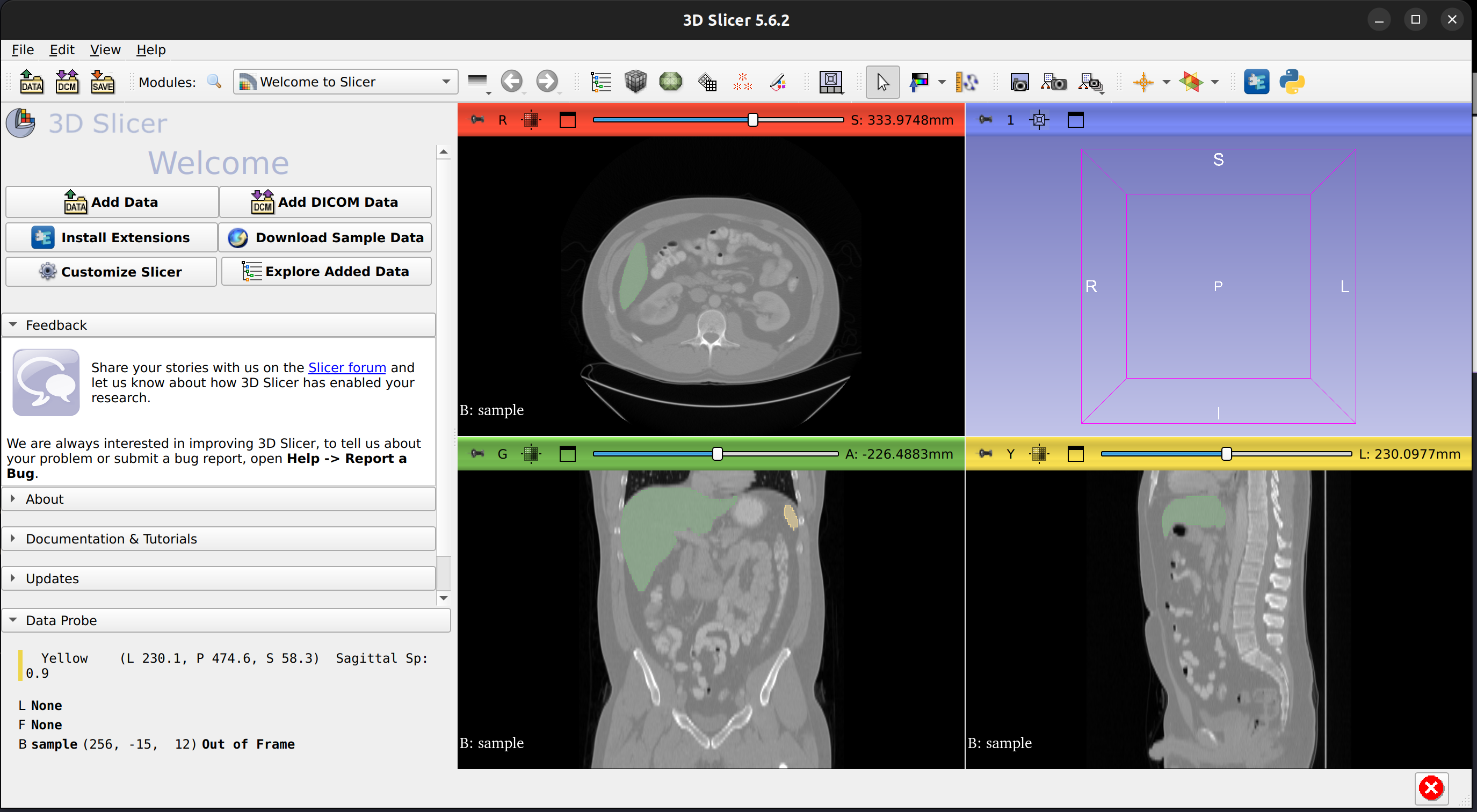
In this section, we will show how to view the sample data and segmentation results returned from Vista-3D.
- Download 3D Slicer: https://download.slicer.org/
- Decompress and launch 3D Slicer
tar -xvzf Slicer-5.6.2-linux-amd64.tar.gz
- Locate the sample data volume and the segmentation results in
build/nvidia_nim_imaging/applications/nvidia_nim/nvidia_nim_imaging
drwxr-xr-x 3 user domain-users     4096 Jul  3 11:41 ./
drwxr-xr-x 4 user domain-users     4096 Jul  3 11:40 ../
-rw-r--r-- 1 user user         27263336 Jul 23 14:22 example-1_seg.nrrd
-rw-r--r-- 1 user user         33037057 Jul 23 14:21 sample.nii.gz
- In 3D Slicer, click File, Add Data and click Choose File(s) to Add.
From the Add Data into the scene dialog, find and add the
sample.nii.gzfile and theexample-1_seg.nrrdfile. For thesample.nrrdfile, select Segmentation and click Ok.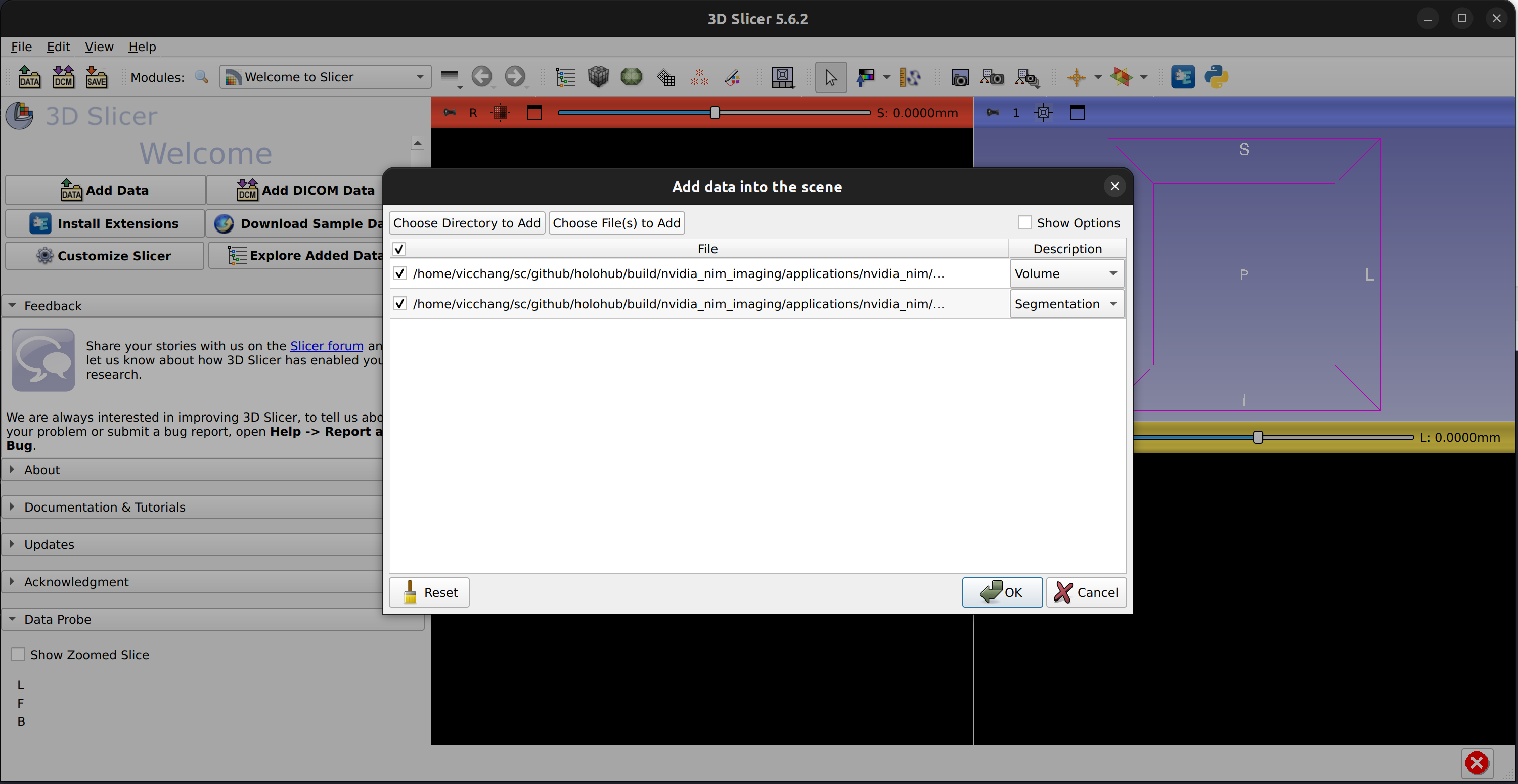
- 3D Slicer shall display the volume and the segmentation results as shown below: