Legacy example · C++ · Python · Version 1.0
Multi AI Detection and Tool Segmentation
| Authors | Holoscan Team (NVIDIA) |
|---|---|
| Supported platforms | x86_64, aarch64 |
| Language | C++, Python |
| Version | 1.0 |
| Compatibility | HSDK 0.6 |
| Contribution level | Level 2 · Quality code |
| Source | HoloHub |
Legacy HoloHub application
This application comes from HoloHub and was last tested with Holoscan SDK (HSDK) 0.6. It runs with the HoloHub CLI, ./holohub.
In this application, we show how to build a Multi AI application with detection and segmentation models, write postprocessing operators using CuPy and NumPy in Python tensor interop and MatX library (An efficient C++17 GPU numerical computing library with Python-like syntax) in C++ tensor interop, and pass multiple tensors from postprocessing to Holoviz.
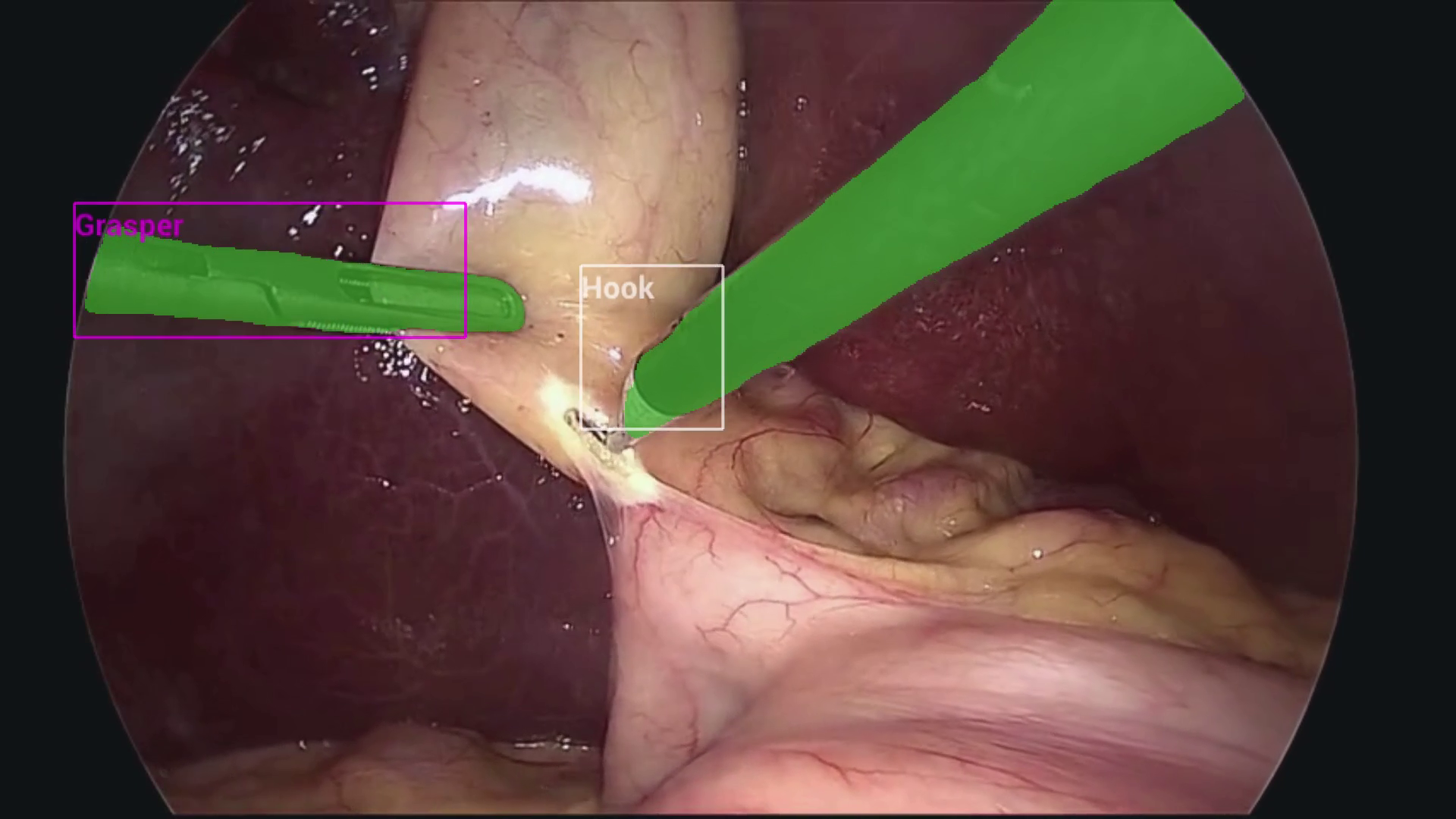 Fig. 1 Endoscopy (laparoscopy) image from a cholecystectomy (gallbladder removal surgery) showing tool detection and segmentation results from two concurrently executed AI models.
Image courtesy of Research Group Camma, IHU Strasbourg and the University of Strasbourg (NGC Resource)
Fig. 1 Endoscopy (laparoscopy) image from a cholecystectomy (gallbladder removal surgery) showing tool detection and segmentation results from two concurrently executed AI models.
Image courtesy of Research Group Camma, IHU Strasbourg and the University of Strasbourg (NGC Resource)
Please refer to the README under ./app_dev_process to see the process of developing the applications.
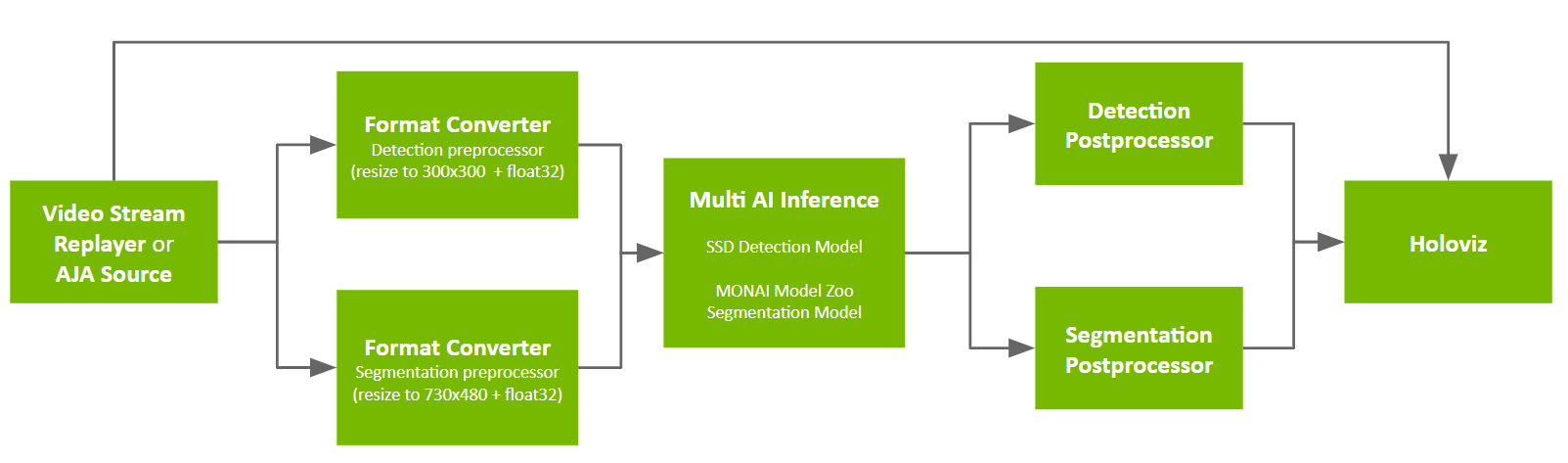
The application graph looks like:
Model
We combine two models from the single model applications SSD Tool Detection and MONAI Endoscopic Tool Segmentation:
- SSD model from NGC with additional NMS op:
epoch24_nms.onnx - MONAI tool segmentation model from NGC:
model_endoscopic_tool_seg_sanitized_nhwc_in_nchw_out.onnx
Data
📦️ (NGC) Sample App Data for AI-based Endoscopy Tool Tracking
Requirements
Ensure you have installed the Holoscan SDK via one of the methods specified in the SDK user guide.
The directory specified by --data at app runtime is assumed to contain three subdirectories, corresponding to the three NGC resources specified in Model and Data: endoscopy, monai_tool_seg_model and ssd_model. These resources will be automatically downloaded to the holohub data directory when building the application.
Building and Running the Application
Python Apps
To run the Python application, you can make use of the run script
./holohub run multiai_endoscopy --language python
Alternatively, to run this application, you'll need to configure your PYTHONPATH environment variable to locate the necessary python libraries based on your Holoscan SDK installation type.
You should refer to the glossary for the terms defining specific locations within HoloHub.
If your Holoscan SDK installation type is:
- python wheels:
export PYTHONPATH=$PYTHONPATH:<HOLOHUB_BUILD_DIR>/python/lib
- otherwise:
export PYTHONPATH=$PYTHONPATH:<HOLOSCAN_INSTALL_DIR>/python/lib:<HOLOHUB_BUILD_DIR>/python/lib
Next, run the application:
cd <HOLOHUB_SOURCE_DIR>/applications/multiai_endoscopy/python
python3 multi_ai.py --data <DATA_DIR>
C++ Apps
There are three versions of C++ apps, with the only difference being that they implement the inference post-processing operator DetectionPostprocessorOp in different ways:
post-proc-cpu: Multi-AI app running the inference post-processing operator on the CPU usingstdfeatures only.post-proc-matx-cpu: Multi-AI app running the inference post-processing operator on the CPU using the MatX library).post-proc-matx-gpu: Multi-AI app running the inference post-processing operator on the GPU using MatX (CUDA).
To run post-proc-cpu, you can simply run:
./holohub run multiai_endoscopy --language cpp
For the other two C++ applications, you'll need to build these without the Holohub CLI as follows.
To run post-proc-matx-cpu or post-proc-matx-gpu, first navigate to the app directory.
cd applications/multiai_endoscopy/cpp/post-proc-matx-cpu
Next we need to configure and build the app.
Configuring
First, create a build folder:
mkdir -p build
then run CMake configure with:
cmake -S . -B build
Unless you make changes to CMakeLists.txt, this step only needs to be done once.
Building
The app can be built with:
cmake --build build
or equally:
cd build
make
Running
You can run the app with:
./build/multi_ai --data <DATA_DIR>