Legacy example · C++ · Version 1.0.0
Holoscan to GStreamer
Push Holoscan video data into GStreamer pipelines. Supports V4L2 cameras and pattern generators. Bridge data from Holoscan to GStreamer for encoding, streaming, or processing.
| Authors | Holoscan Team (NVIDIA) |
|---|---|
| Supported platforms | aarch64, x86_64 |
| Language | C++ |
| Version | 1.0.0 |
| Compatibility | HSDK 3.8 |
| Contribution level | Level 2 · Quality code |
| Source | HoloHub |
Legacy HoloHub application
This application comes from HoloHub and was last tested with Holoscan SDK (HSDK) 3.8. It runs with the HoloHub CLI, ./holohub.
A Holoscan application that pushes video data from Holoscan operators into GStreamer pipelines for processing, encoding, and streaming.
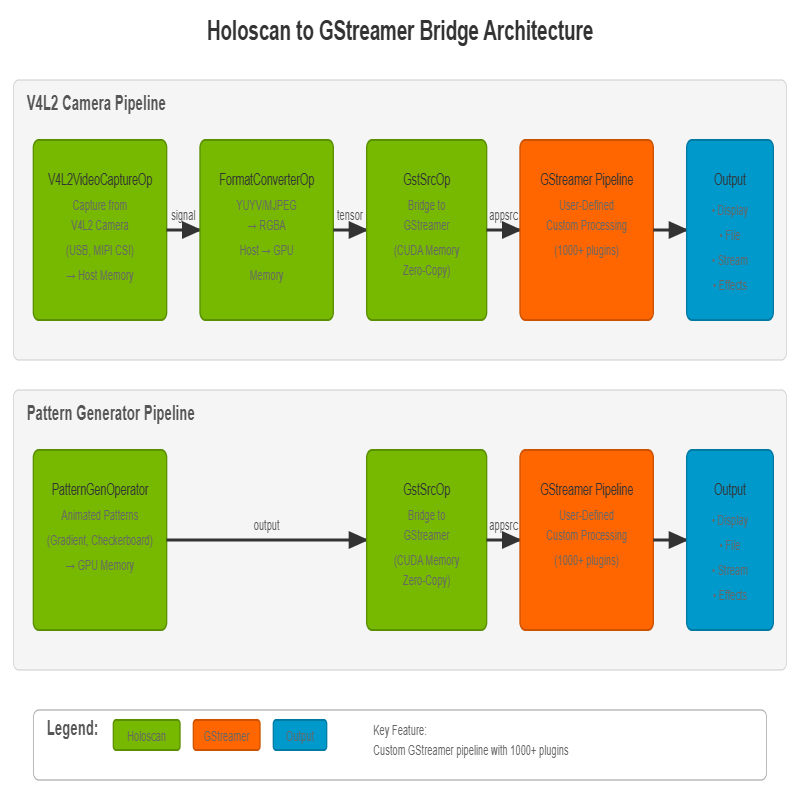
Fig. 1: Application architecture showing the integration of Holoscan operators with GStreamer's flexible processing pipeline
Description
This application showcases how to:
- Capture video from V4L2 cameras (USB webcams, MIPI cameras, etc.) or generate test patterns
- Push video frames from Holoscan to GStreamer for processing
- Build custom GStreamer pipelines for your specific use case (encoding, streaming, effects, etc.)
- Stream or record video using any combination of GStreamer's 1000+ plugins
- Use different video codecs and effects through GStreamer plugins
- Support both host and CUDA device memory for zero-copy operation
Key Feature: Custom Pipeline Construction
The application provides a flexible bridge between Holoscan and GStreamer. You can construct any GStreamer pipeline you want - the examples provided are just demonstrations. This enables unlimited possibilities:
- Video encoding (H.264, H.265, VP8, VP9, AV1, etc.)
- Live streaming (RTP, RTSP, WebRTC, HLS, etc.)
- Video effects and filters (flip, rotate, color correction, etc.)
- Format conversion (resize, colorspace, etc.)
- Multi-output (tee to multiple destinations)
- Custom plugins (use your own GStreamer plugins)
Supported Video Sources:
- V4L2 Camera - Capture from any V4L2-compatible camera (USB webcams, MIPI cameras, etc.)
- Pattern Generator - Generate animated test patterns (gradient, checkerboard, color bars)
Requirements
- NVIDIA Holoscan SDK
- GStreamer 1.0 with the following plugins:
- gstreamer1.0-plugins-base (videoconvert for host memory support)
- gstreamer1.0-plugins-bad (cudaconvert, cudadownload, nvh264enc, nvh265enc for NVIDIA hardware encoding)
- gstreamer1.0-plugins-good (mp4mux, matroskamux for container formats, autovideosink for display)
- gstreamer1.0-plugins-ugly (x264enc for CPU-based H.264 encoding)
- Additional codecs available through gstreamer1.0-libav if needed
- V4L2-compatible camera (optional, for camera capture mode)
- USB webcams, MIPI CSI cameras, or any V4L2 video device
- Use
v4l2-ctl --list-devicesto see available cameras
Quick Start
To run the application with the default settings, simply run one of the following commands:
A. Using the V4L2 camera:
./holohub run holo_to_gst v4l2
B. Generating test patterns:
./holohub run holo_to_gst pattern
These single-line commands will build and run the customized container for this application with all the dependencies installed, and then build and start the application using the default settings.
Building
Option 1: Containerized Build (Recommended)
No setup required - all dependencies are included in the container:
./holohub build holo_to_gst
Option 2: Local Build
For faster builds and easier debugging. First install dependencies, then build locally:
# Install dependencies (from workspace root)
./applications/gstreamer/install_deps.sh

# Then build locally
./holohub build --local holo_to_gst
The install_deps.sh script installs:
- pkg-config (required for CMake)
- GStreamer development libraries
- All necessary GStreamer plugins for processing and encoding
Usage
The recommended way to run the application is through the holohub launcher with predefined modes:
./holohub run holo_to_gst [MODE] [--run-args="[OPTIONS]"]
Available modes:
v4l2- Display live feed from V4L2 camerapattern- Display animated gradient pattern
You can override or extend mode settings with --run-args:
./holohub run holo_to_gst v4l2 --run-args="--count 300 --pipeline '...'"
Alternatively, if you know the binary location, you can run it directly:
holo-to-gst [OPTIONS]
Options
General Options:
--source <type>- Video source:patternorv4l2(default: pattern)-c, --count <number>- Number of frames to capture/generate (default: unlimited)-f, --framerate <fps>- Frame rate in frames per second (default: 30)-p, --pipeline <desc>- GStreamer pipeline description (default:cudadownload name=src ! videoconvert ! autovideosink sync=false)- IMPORTANT: Your pipeline MUST name the first element as 'src'
- Build any pipeline you want: The examples are just suggestions - you have full access to GStreamer's 1000+ plugins
- Examples: encoding, streaming, effects, filters, multi-output, custom plugins, etc.
--caps <caps_string>- GStreamer capabilities for the source (default:video/x-raw,format=RGBA)--help- Show help message
Resolution Options:
-w, --width <pixels>- Frame width (default: 1920)- For V4L2: Must match a supported camera resolution
- For pattern: Any reasonable resolution (64-8192 pixels)
-h, --height <pixels>- Frame height (default: 1080)- For V4L2: Must match a supported camera resolution
- For pattern: Any reasonable resolution (64-8192 pixels)
V4L2 Camera Options:
--device <path>- V4L2 device path (default: /dev/video0)- Use
v4l2-ctl --list-devicesto find the correct device - Some devices (like
/dev/video1) may be metadata-only and won't work --pixel-format <format>- V4L2 pixel format (default: auto)- Must use 4-character FourCC codes:
YUYV,MJPG,NV12 YUYV/NV12: Uncompressed, typically max 1920x1080MJPG: Compressed, supports higher resolutions (4K on some cameras)auto: Automatically selects format (usually YUYV for lower resolutions)--storage <type>- Must be set to1for V4L2 (FormatConverterOp outputs GPU memory)
Pattern Generator Options:
--pattern <type>- Pattern type (default: 0)- 0 = animated gradient
- 1 = animated checkerboard
- 2 = color bars (SMPTE style)
--storage <type>- Memory storage type (default: 1)- 0 = host memory
- 1 = device/CUDA memory
Examples
Note: The following examples demonstrate common use cases. You can construct any GStreamer pipeline you want by using the --pipeline parameter. These are just starting points - feel free to combine, modify, or create entirely new pipelines using GStreamer's extensive plugin ecosystem.
V4L2 Camera Examples
Important Note: V4L2 cameras expose multiple /dev/videoX devices. Use v4l2-ctl --list-devices to identify the main video capture device (usually /dev/video0). Some devices like /dev/video1 may be metadata-only and won't work for video capture.
Display live camera feed (default 1920x1080):
./holohub run holo_to_gst v4l2
Record from default V4L2 camera (30 seconds at 30 FPS, 1080p):
./holohub run holo_to_gst v4l2 --run-args="--count 900 --pipeline 'cudadownload name=src ! videoconvert ! x264enc ! mp4mux ! filesink location=/workspace/holohub/camera.mp4'"
The output file will be available at holohub/camera.mp4 on your host.
Record at 720p resolution with GPU encoder:
./holohub run holo_to_gst v4l2 --run-args="--width 1280 --height 720 --count 600 --pipeline 'cudaconvert name=src ! nvh264enc ! h264parse ! mp4mux ! filesink location=/workspace/holohub/camera_720p.mp4'"
Record in 4K (may require MJPG format for high resolution):
./holohub run holo_to_gst v4l2 --run-args="--width 3840 --height 2160 --pixel-format MJPG --count 300 --pipeline 'cudaconvert name=src ! nvh264enc ! h264parse ! mp4mux ! filesink location=/workspace/holohub/camera_4k.mp4'"
Stream camera over network (RTP):
Important: For UDP streaming, start the receiver FIRST, then the sender. UDP is connectionless - packets sent before the receiver is ready are lost.
Terminal 1 - Start receiver first:
gst-launch-1.0 udpsrc port=5000 caps="application/x-rtp,encoding-name=H264" ! rtph264depay ! h264parse ! avdec_h264 ! videoconvert ! autovideosink
Terminal 2 - Then start streaming (no --count for continuous streaming):
./holohub run holo_to_gst v4l2 --run-args="--pipeline 'cudaconvert name=src ! nvh264enc ! h264parse ! rtph264pay ! udpsink host=127.0.0.1 port=5000'"
Checking Camera Capabilities:
Before running, check your camera's supported formats and resolutions:
# List all V4L2 devices
v4l2-ctl --list-devices

# Check supported formats for a specific device (usually /dev/video0)
v4l2-ctl --list-formats-ext -d /dev/video0
Pattern Generator Examples
Display animated gradient (default):
./holohub run holo_to_gst pattern
Display checkerboard pattern:
./holohub run holo_to_gst pattern --run-args="--pattern 1"
Record pattern to file (10 seconds at 30 FPS):
./holohub run holo_to_gst pattern --run-args="--count 300 --pipeline 'cudadownload name=src ! videoconvert ! x264enc ! mp4mux ! filesink location=/workspace/holohub/output.mp4'"
Record 720p video:
./holohub run holo_to_gst pattern --run-args="--width 1280 --height 720 --count 300 --pipeline 'cudadownload name=src ! videoconvert ! x264enc ! mp4mux ! filesink location=/workspace/holohub/output_720p.mp4'"
Stream pattern over network:
Terminal 1 - Start receiver first:
gst-launch-1.0 udpsrc port=5000 caps="application/x-rtp,encoding-name=H264" ! rtph264depay ! h264parse ! avdec_h264 ! videoconvert ! autovideosink
Terminal 2 - Then start streaming:
./holohub run holo_to_gst pattern --run-args="--pipeline 'cudadownload name=src ! videoconvert ! x264enc ! rtph264pay ! udpsink host=127.0.0.1 port=5000'"
Architecture
The application supports two video sources and uses GStreamer for output processing:
Video Sources
- V4L2VideoCaptureOp: Captures video from V4L2-compatible cameras (USB webcams, MIPI CSI cameras, etc.)
- PatternGenOperator: Generates animated test patterns as Holoscan entities with tensors
Output Bridge
- GstSrcOp: Receives video frames and pushes them into GStreamer via GstSrcResource
Pipeline Flow
V4L2 Camera Pipeline:
V4L2VideoCaptureOp → FormatConverterOp → GstSrcOp → GStreamer Pipeline → Output
Pattern Generator Pipeline:
PatternGenOperator → GstSrcOp → GStreamer Pipeline → Output
The GStreamer pipeline is user-defined and can include any GStreamer elements:
- Display:
cudadownload name=src ! videoconvert ! autovideosink - CPU Encoding:
cudadownload name=src ! videoconvert ! x264enc ! h264parse ! mp4mux ! filesink location=/workspace/holohub/output.mp4 - GPU Encoding:
cudaconvert name=src ! nvh264enc ! h264parse ! mp4mux ! filesink location=/workspace/holohub/output.mp4 - Streaming:
cudaconvert name=src ! nvh264enc ! h264parse ! rtph264pay ! udpsink host=<ip> port=<port> - Effects:
cudadownload name=src ! videoconvert ! videoflip ! videobalance ! autovideosink - Multi-output:
cudadownload name=src ! videoconvert ! tee ! [multiple outputs] - Custom: Any combination of GStreamer plugins - the possibilities are endless!
Pipeline Flexibility: You have full access to GStreamer's ecosystem of 1000+ plugins. Build complex pipelines for your specific needs - these examples just scratch the surface.
Performance
The application supports both host and device (CUDA) memory:
- Device memory (
--storage 1, default): Zero-copy operation for better performance when using NVIDIA hardware encoders or GPU effects - Host memory (
--storage 0): Required for some CPU-based GStreamer elements
Important: V4L2 sources must use --storage 1 as FormatConverterOp outputs GPU memory.
Notes
Video source details
V4L2 Camera:
- Supports any V4L2-compatible camera (USB webcams, MIPI CSI cameras)
- Important: V4L2 cameras expose multiple
/dev/videoXdevices - Use
v4l2-ctl --list-devicesto identify your camera - Main video capture device is usually
/dev/video0 - Other devices (like
/dev/video1) may be metadata-only and won't work for video capture - Camera resolution MUST match a supported resolution - the default is 1920x1080
- Use
v4l2-ctl --list-formats-ext -d /dev/video0to see supported resolutions and formats - Pixel format matters for resolution:
- Uncompressed formats (
YUYV,NV12): Typically max out at 1920x1080 - Compressed format (
MJPG): Supports higher resolutions (up to 4K on capable cameras) - Use
--pixel-format MJPGfor 4K/high-resolution recording - Pixel format must be specified as 4-character FourCC codes (e.g.,
MJPG, notMJPEG) - Common resolutions: 640x480, 1280x720, 1920x1080, 3840x2160 (check your specific camera)
- FormatConverterOp automatically converts camera output to RGBA on GPU
- Must use
--storage 1as FormatConverterOp outputs GPU memory
Pattern Generator:
- Supports three test patterns:
- Animated gradient (default): Colorful sine wave patterns
- Animated checkerboard: Moving checkerboard with variable square size
- Color bars: SMPTE-style color bars (7 colors)
- Useful for testing the pipeline without hardware dependencies
- Supports both host (
--storage 0) and device (--storage 1) memory
GStreamer Pipeline
- Pipeline element naming: The first element MUST be named 'src' for proper linking
- Full customization: You can use ANY GStreamer elements and build any pipeline you need
- Examples provided are starting points: Modify, combine, or create entirely new pipelines
- GPU pipelines: Use
cudaconvertto keep data on GPU (best for GPU encoders) - CPU pipelines: Use
cudadownloadto transfer to host memory (required for CPU encoders/effects) - Sync behavior: Use
sync=falseonautovideosinkfor real-time display without timestamp synchronization - Discover elements: Use
gst-inspect-1.0to explore GStreamer's extensive plugin library (1000+ elements)
Output
- Frame count can be limited with
--countor runs indefinitely if not specified - The application manages GStreamer pipeline lifecycle and handles cleanup properly
- EOS (End-Of-Stream) signal is sent automatically when frame generation completes
File Output Paths:
When running through holohub run (in a container), use absolute paths for file output:
- Inside container:
/workspace/holohub/filename.mp4 - On your host:
<workspace_path>/filename.mp4(wherever your holohub workspace is located)
The container mounts your workspace root at /workspace/holohub, so files written there are accessible on your host.
See Also
gst_video_recorder- Records video to files using GStreamer encoding- GStreamer documentation
- Holoscan SDK documentation