Legacy example · C++ · Version 1.0.0
GStreamer to Holoscan
Bridge GStreamer pipelines into Holoscan for visualization with Holoviz. Supports CPU and GPU memory paths, multiple video formats (RGBA, I420, NV12), and dynamic pipelines with automatic format detection. Can display from files (MP4, etc.), cameras (V4L2), streams (RTSP), test patterns, and more.
| Authors | Holoscan Team (NVIDIA) |
|---|---|
| Supported platforms | aarch64, x86_64 |
| Language | C++ |
| Version | 1.0.0 |
| Compatibility | HSDK 3.8 |
| Contribution level | Level 2 · Quality code |
| Source | HoloHub |
Legacy HoloHub application
This application comes from HoloHub and was last tested with Holoscan SDK (HSDK) 3.8. It runs with the HoloHub CLI, ./holohub.
A Holoscan application that receives video data from GStreamer pipelines and displays it using Holoviz, enabling integration of any GStreamer video source into Holoscan applications.
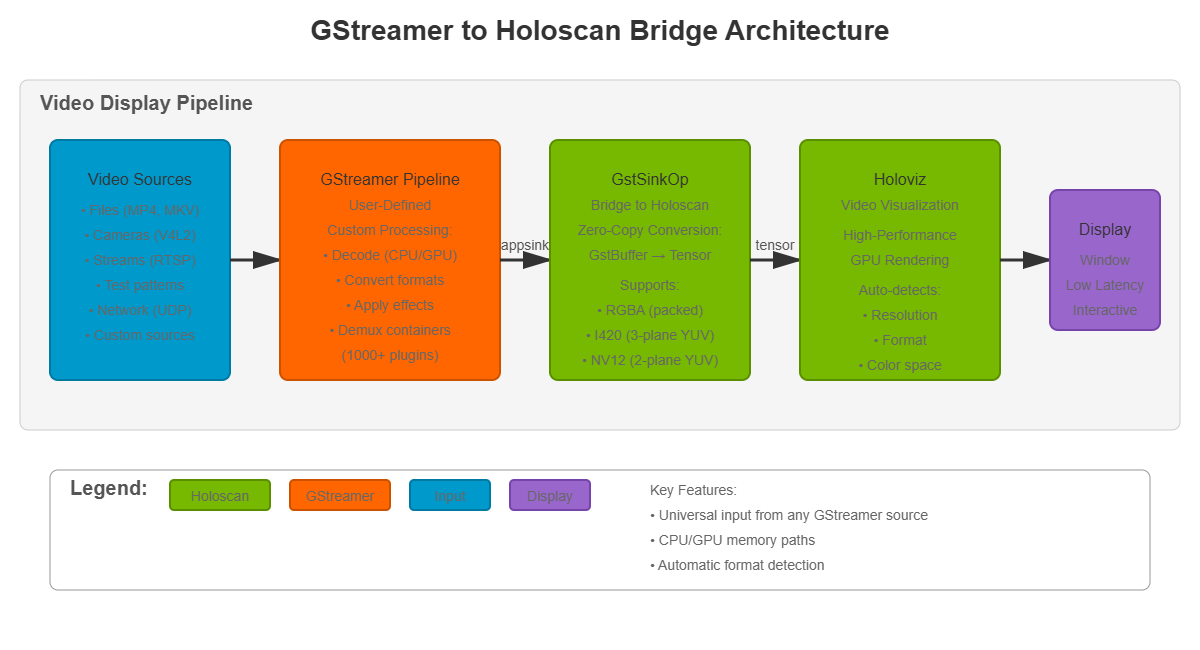
Fig. 1: Application architecture
Application architecture showing the integration of GStreamer pipelines with Holoscan's Holoviz display.
Description
This application showcases how to:
- Receive video from any GStreamer pipeline into Holoscan
- Build custom GStreamer pipelines as video sources (files, cameras, streams, effects, etc.)
- Display video using Holoscan's Holoviz operator with zero-copy operation
- Support both CPU and GPU memory paths for optimal performance
- Handle multiple video formats (RGBA, I420, NV12) automatically
- Process video with GStreamer's 1000+ plugins before display
Key Feature: Universal Video Input
The application provides a flexible bridge from GStreamer to Holoscan. You can construct any GStreamer pipeline as your video source - the examples provided are just demonstrations. This enables unlimited input possibilities:
- Video file playback (MP4, MKV, AVI, WebM, etc.)
- Live camera capture (V4L2, RTSP, IP cameras, etc.)
- Network streaming (RTP, RTSP, HTTP, UDP, etc.)
- Video effects and filters (before display)
- Format conversion and decoding (automatic)
- Test patterns (videotestsrc)
- Custom plugins (use your own GStreamer sources)
Supported Video Formats:
The sink automatically detects and handles:
- RGBA - Most common RGB format
- I420 - YUV 4:2:0 planar (3-plane)
- NV12 - YUV 4:2:0 semi-planar (2-plane)
- Other formats can be added by extending the bridge
Requirements
- NVIDIA Holoscan SDK
- GStreamer 1.0 with the following plugins:
- gstreamer1.0-plugins-base (videoconvert, videotestsrc, filesrc)
- gstreamer1.0-plugins-bad (cudaconvert, cudaupload for GPU support, nvh264dec for GPU decoding)
- gstreamer1.0-plugins-good (qtdemux, matroskademux for container formats, v4l2src for cameras, rtph264depay for streaming)
- gstreamer1.0-plugins-ugly (avdec_h264 for CPU-based H.264 decoding)
- Additional codecs available through gstreamer1.0-libav if needed
Quick Start
To run the application with the default test pattern:
./holohub run gst_to_holo
This single-line command will build and run the customized container for this application with all the dependencies installed, and then build and start the application displaying a test pattern.
Building
Option 1: Containerized Build (Recommended)
No setup required - all dependencies are included in the container:
./holohub build gst_to_holo
Option 2: Local Build
For faster builds and easier debugging. First install dependencies, then build locally:
# Install dependencies (from workspace root)
./applications/gstreamer/install_deps.sh

# Then build locally
./holohub build --local gst_to_holo
The install_deps.sh script installs:
- pkg-config (required for CMake)
- GStreamer development libraries
- All necessary GStreamer plugins for video sources and decoding
Usage
The recommended way to run the application is through the holohub launcher:
./holohub run gst_to_holo --run-args="[OPTIONS]"
Alternatively, if you know the binary location, you can run it directly:
gst-to-holo [OPTIONS]
Options
General Options:
-c, --count <number>- Number of iterations to run (default: unlimited)- Useful for testing or limiting runtime
- Application exits after processing this many frames
-p, --pipeline <desc>- GStreamer pipeline description (default:videotestsrc pattern=0 ! videoconvert name=sink)- IMPORTANT: Your pipeline MUST name the final element as 'sink'
- Build any pipeline you want: The examples are just suggestions - you have full access to GStreamer's 1000+ plugins
- Examples: file playback, cameras, streams, effects, custom sources, etc.
--caps <caps_string>- GStreamer capabilities for the sink (default:video/x-raw,format=RGBA)- Use
video/x-raw,format=RGBAfor CPU memory path - Use
video/x-raw(memory:CUDAMemory),format=RGBAfor GPU memory path -h, --help- Show help message
Examples
Note: The following examples demonstrate common use cases. You can construct any GStreamer pipeline you want by using the --pipeline parameter. These are just starting points - feel free to combine, modify, or create entirely new pipelines using GStreamer's extensive plugin ecosystem.
Test Pattern Examples
Display test pattern (default):
./holohub run gst_to_holo
Display test pattern with frame limit:
./holohub run gst_to_holo --run-args="--count 300"
File Playback Examples
Important Note: When running through holohub run (in a container), use absolute paths:
- Inside container:
/workspace/holohub/video.mp4 - On your host:
<workspace_path>/video.mp4(wherever your holohub workspace is located)
Play MP4 file (CPU decode, CPU memory):
./holohub run gst_to_holo --run-args="--pipeline 'filesrc location=/workspace/holohub/video.mp4 ! qtdemux ! h264parse ! avdec_h264 ! videoconvert name=sink'"
Play MP4 file (GPU decode, GPU memory for zero-copy):
./holohub run gst_to_holo --run-args="--pipeline 'filesrc location=/workspace/holohub/video.mp4 ! qtdemux ! h264parse ! nvh264dec ! cudaconvert name=sink' --caps 'video/x-raw(memory:CUDAMemory),format=RGBA'"
Play MKV file with automatic format detection:
./holohub run gst_to_holo --run-args="--pipeline 'filesrc location=/workspace/holohub/video.mkv ! matroskademux ! h264parse ! avdec_h264 ! videoconvert name=sink'"
Play video with uridecodebin (automatic decoding):
./holohub run gst_to_holo --run-args="--pipeline 'uridecodebin uri=file:///workspace/holohub/video.mp4 ! videoconvert name=sink'"
Camera Examples
Display from V4L2 camera:
./holohub run gst_to_holo --run-args="--pipeline 'v4l2src device=/dev/video0 ! videoconvert name=sink'"
Display from V4L2 camera with specific resolution:
./holohub run gst_to_holo --run-args="--pipeline 'v4l2src device=/dev/video0 ! video/x-raw,width=1280,height=720 ! videoconvert name=sink'"
Display from V4L2 camera with GPU acceleration:
./holohub run gst_to_holo --run-args="--pipeline 'v4l2src device=/dev/video0 ! videoconvert ! cudaupload ! cudaconvert name=sink' --caps 'video/x-raw(memory:CUDAMemory),format=RGBA'"
Network Streaming Examples
Receive RTP H.264 stream:
Important: For UDP streaming, start the receiver FIRST, then the sender. UDP is connectionless - packets sent before the receiver is ready are lost.
Terminal 1 - Start receiver (gst_to_holo):
./holohub run gst_to_holo --run-args="--pipeline 'udpsrc port=5000 caps=\"application/x-rtp,encoding-name=H264\" ! rtph264depay ! h264parse ! avdec_h264 ! videoconvert name=sink'"
Terminal 2 - Then start sender:
gst-launch-1.0 videotestsrc ! videoconvert ! x264enc ! rtph264pay ! udpsink host=127.0.0.1 port=5000
Connect to RTSP stream:
./holohub run gst_to_holo --run-args="--pipeline 'rtspsrc location=rtsp://example.com/stream ! decodebin ! videoconvert name=sink'"
Receive RTSP stream with GPU decode:
./holohub run gst_to_holo --run-args="--pipeline 'rtspsrc location=rtsp://example.com/stream ! rtph264depay ! h264parse ! nvh264dec ! cudaconvert name=sink' --caps 'video/x-raw(memory:CUDAMemory),format=RGBA'"
Advanced Examples
Apply video effects before display:
./holohub run gst_to_holo --run-args="--pipeline 'filesrc location=/workspace/holohub/video.mp4 ! qtdemux ! h264parse ! avdec_h264 ! videoconvert ! videoflip method=horizontal-flip ! videobalance brightness=0.2 ! videoconvert name=sink'"
Display with scaling:
./holohub run gst_to_holo --run-args="--pipeline 'filesrc location=/workspace/holohub/video.mp4 ! qtdemux ! h264parse ! avdec_h264 ! videoconvert ! videoscale ! video/x-raw,width=1280,height=720 ! videoconvert name=sink'"
Architecture
The application uses a simple pipeline to receive video from GStreamer and display it:
Pipeline Flow
GStreamer Pipeline → GstSinkOp → Holoviz → Display
GStreamer Pipeline (user-defined):
- Can be any GStreamer source or processing pipeline
- Must name the final element as 'sink' for proper linking
- Automatically negotiates format with the Holoscan sink
GstSinkOp:
- Receives video frames from GStreamer via GstSinkResource
- Converts GStreamer buffers to Holoscan tensors
- Handles both CPU and GPU memory paths
- Supports multiple video formats (RGBA, I420, NV12)
Holoviz:
- Displays the video frames in a window
- Provides high-performance rendering
- Automatically handles format-specific display requirements
Performance
The application supports both host and device (CUDA) memory paths:
CPU Memory Path (Default)
--caps "video/x-raw,format=RGBA"
- Uses host memory for video buffers
- Required for CPU-based decoders (avdec_h264, etc.)
- Data is copied from host to GPU for display
- Compatible with all GStreamer elements
GPU Memory Path (Zero-Copy)
--caps "video/x-raw(memory:CUDAMemory),format=RGBA"
- Uses GPU memory for video buffers
- Requires GPU-capable GStreamer elements (nvh264dec, cudaconvert)
- Zero-copy operation for best performance
- Eliminates host-to-device memory transfers
Performance Recommendations:
- For file playback: Use GPU decode (
nvh264dec) with CUDA memory for best performance - For cameras: CPU path is usually sufficient unless doing heavy processing
- For streams: GPU decode reduces latency and CPU usage
- For effects: Keep data on GPU (
cudaupload,cudaconvert) if possible
Notes
GStreamer Pipeline
- Pipeline element naming: The final element MUST be named 'sink' for proper linking
- Full customization: You can use ANY GStreamer elements and build any pipeline you need
- Examples provided are starting points: Modify, combine, or create entirely new pipelines
- Dynamic elements: Elements like
qtdemux,decodebin,uridecodebinwork automatically - Format handling: The sink automatically detects and handles RGBA, I420, and NV12 formats
- GPU pipelines: Use
cudaconvertas the final element with--capscontainingmemory:CUDAMemory - CPU pipelines: Use
videoconvertas the final element (default) - Discover elements: Use
gst-inspect-1.0to explore GStreamer's extensive plugin library (1000+ elements)
Video Formats
The application automatically detects and handles:
- RGBA (8-bit per channel, 4 channels): Most common RGB format
- I420 (YUV 4:2:0 planar): Y, U, V in separate planes (common in video codecs)
- NV12 (YUV 4:2:0 semi-planar): Y plane + interleaved UV plane (efficient for hardware)
Format conversion is handled by GStreamer (videoconvert or cudaconvert), so you don't need to worry about input format - just ensure your pipeline ends with one of these formats.
Display
- The Holoviz window can be closed at any time to exit the application
- Press
Ctrl+Cin the terminal to gracefully shut down - Frame count can be limited with
--countor runs indefinitely if not specified - The application manages GStreamer pipeline lifecycle and handles cleanup properly
File Paths in Containers
When running through holohub run (in a container):
- Inside container:
/workspace/holohub/maps to your workspace root - On your host:
<workspace_path>/(wherever your holohub workspace is located) - Always use
/workspace/holohub/prefix in your pipeline commands
Example:
--pipeline "filesrc location=/workspace/holohub/video.mp4 ! ..."
Troubleshooting
Issue: "Could not find element named 'sink' in pipeline"
- Solution: Make sure your pipeline ends with
name=sink, for example:videoconvert name=sink
Issue: "Failed to link sink to appsink"
- Solution: Ensure the final element's output format is compatible (use
videoconvertorcudaconvert)
Issue: Video plays but display is corrupted
- Solution: Try using CPU path (default caps) instead of GPU path, or vice versa
Issue: "Resource not found" error with file path
- Solution: Check your file path - use
/workspace/holohub/prefix when running in container
Issue: No video from camera
- Solution: Check available cameras with
v4l2-ctl --list-devicesand use correct/dev/videoXdevice
Issue: Network stream not working
- Solution: Make sure receiver is started BEFORE sender for UDP/RTP streams
See Also
holo_to_gst- Pushes Holoscan video data into GStreamer pipelines (reverse direction)gst_video_recorder- Records video to files using GStreamer encoding- GStreamer documentation
- Holoscan SDK documentation
- Holoviz operator documentation