Legacy example · C++ · Python · Version 0.1.0
Foxglove endoscopy tool tracking
Endoscopy tool-tracking graph that publishes video, tool annotations and state to Foxglove Studio.
| Authors | Chris von Csefalvay (HCLTech) |
|---|---|
| Supported platforms | x86_64, aarch64 |
| Language | C++, Python |
| Version | 0.1.0 |
| Compatibility | HSDK 4.6 |
| Contribution level | Level 2 · Quality code |
| Source | HoloHub |
Legacy HoloHub application
This application comes from HoloHub and was last tested with Holoscan SDK (HSDK) 4.6. It runs with the HoloHub CLI, ./holohub.
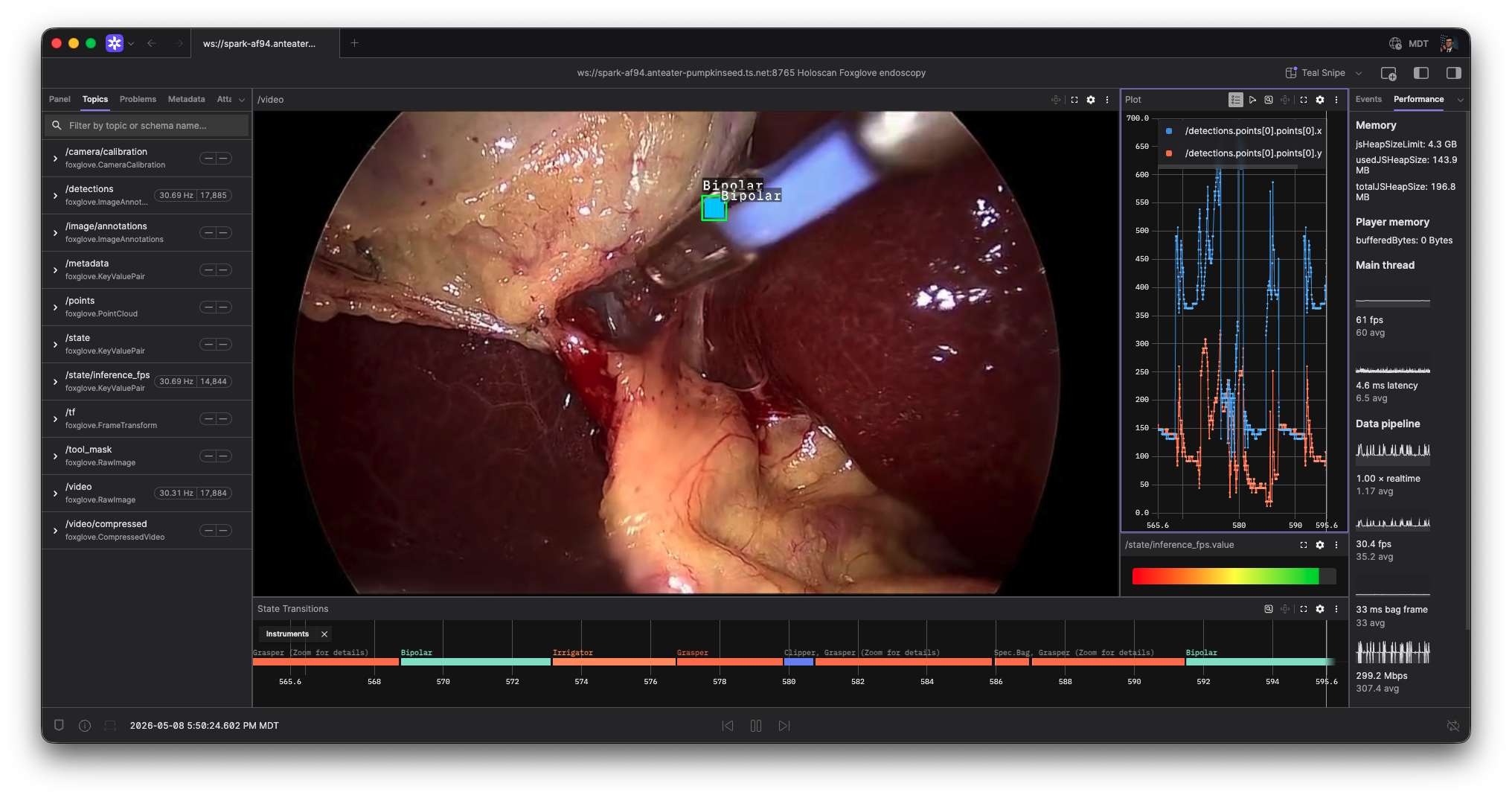
This application shows the Foxglove operator in an endoscopy tool-tracking graph. It replays the standard HoloHub endoscopy sample, runs the existing LSTM tool-tracking inference path, and publishes video, tool-coordinate annotations, and inference FPS to Foxglove Studio.
Requirements
- Holoscan SDK 4.1.0 or newer.
- The HoloHub endoscopy tool-tracking dataset generated through the normal HoloHub data workflow.
- Foxglove Studio installed. The Foxglove web app can also connect, but browser networking restrictions can make local or private-network WebSocket endpoints trickier than the desktop application.
Foxglove Studio setup
Install Foxglove Studio, then start the
application and create a Foxglove WebSocket connection to ws://localhost:8765.
The included app config binds 0.0.0.0, so remote clients on trusted networks
can connect Studio to ws://<target-host>:8765. Foxglove documents the custom
WebSocket connection flow in its
custom data source guide.
The Foxglove web app can be used too, but browser
security policies can make direct WebSocket connections to local or private
hosts more finicky; use the desktop app first when debugging connectivity.
Quick start
You can build and run the application within a container using the following command:
For C++:
./holohub run foxglove_endoscopy_tool_tracking --language cpp
For Python:
./holohub run foxglove_endoscopy_tool_tracking --language python
Then connect Foxglove Studio to ws://localhost:8765.
Topics
The C++ app publishes:
| Topic | Message | Description |
|---|---|---|
/video |
RawImage |
Replayed endoscopy frame. |
/detections |
ImageAnnotations |
Tool points, labels, and small boxes aligned to /video. |
/state/inference_fps |
KeyValuePair |
Inference throughput estimate for plotting. |
The Python app publishes /video, /tool_mask, and /detections. It
demonstrates the Python publisher and tensor/annotation adapter path; the C++
app is the fuller example because it also publishes inference FPS.
Notes
The sample does not publish /tf pose transforms because the source dataset
does not include camera or tool pose data. Pose publishing is implemented in the
operator through FoxglovePoseAdapterOp and is intended for graphs that already
produce a 4x4 transform tensor or xyz+quat tensor.