Legacy example · Python · Version 1.0.0
Florence-2
Florence-2 is a unified vision model that can perform a variety of vision tasks, including detection, segmentation, and tracking.
| Authors | Holoscan Team (NVIDIA) |
|---|---|
| Supported platforms | x86_64, aarch64 |
| Language | Python |
| Version | 1.0.0 |
| Compatibility | HSDK 2.1 |
| Contribution level | Level 1 · Very high-quality code |
| Source | HoloHub |
Legacy HoloHub application
This application comes from HoloHub and was last tested with Holoscan SDK (HSDK) 2.1. It runs with the HoloHub CLI, ./holohub.
This application demonstrates how to run the Florence-2 models on a live video feed with the possibility of changing the task and optional prompt via a QT UI.
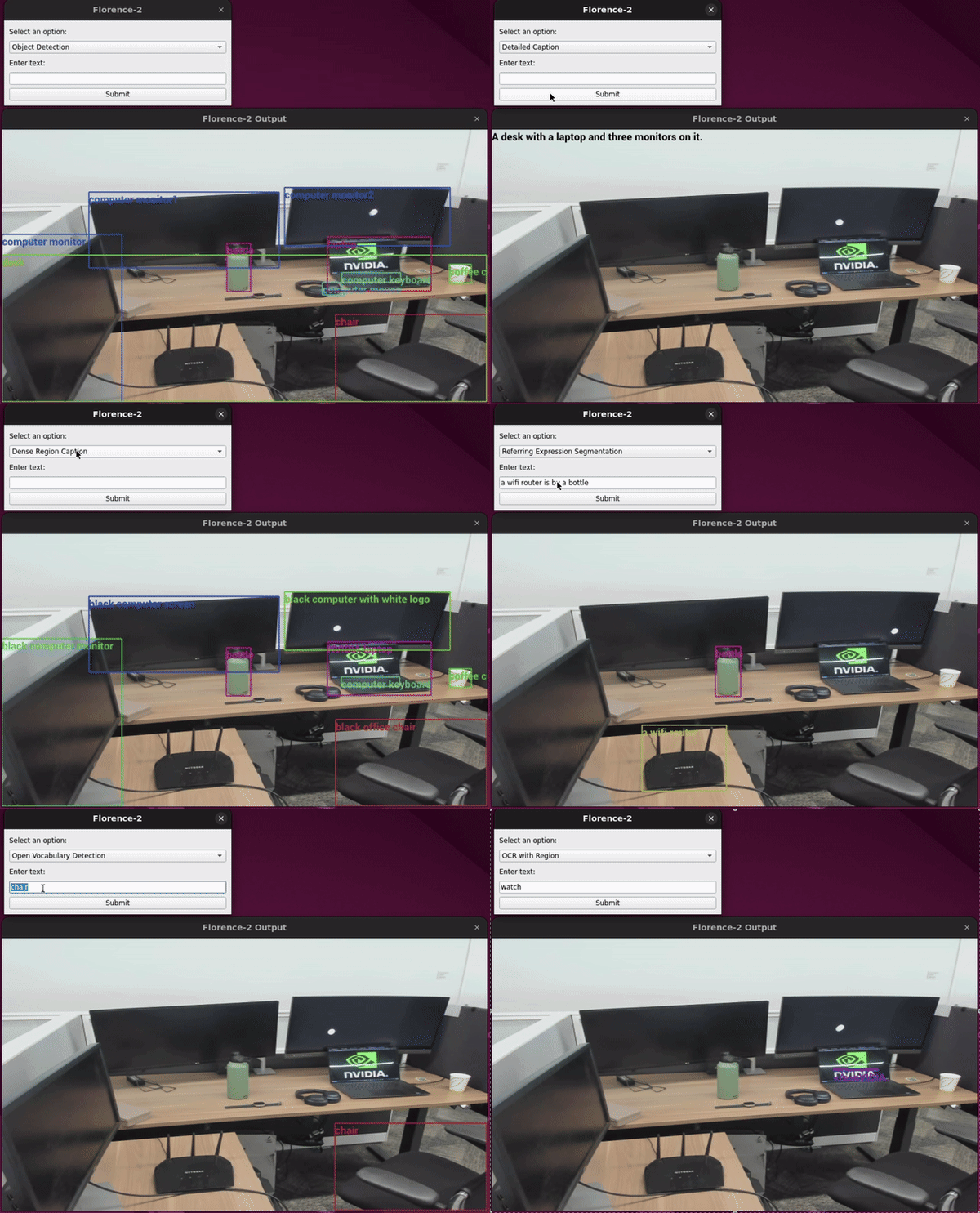
Note: This demo currently uses Florence-2-large-ft, but any of the Florence-2 models should work as long as the correct URLs and names are used in Dockerfile and config.yaml:
⚙️ Setup Instructions
The app defaults to using the video device at /dev/video0
Note: You can use a USB webcam as the video source, or an MP4 video by following the instructions for the V4L2_Camera example app.
To debug if this is the correct device download v4l2-ctl:
sudo apt-get install v4l-utils
To check for your devices run:
v4l2-ctl --list-devices
This command will output something similar to this:
NVIDIA Tegra Video Input Device (platform:tegra-camrtc-ca):
        /dev/media0

vi-output, lt6911uxc 2-0056 (platform:tegra-capture-vi:0):
        /dev/video0

Dummy video device (0x0000) (platform:v4l2loopback-000):
        /dev/video3
Determine your desired video device and edit the source device in config.yaml
🚀 Build and Run Instructions
From the Holohub main directory run the following command:
./holohub run florence-2-vision
Note: The first build will take ~1.5 hours if you're on ARM64. This is largely due to building Flash Attention 2 since pre-built wheels are not distributed for ARM64 platforms.
💻 Supported Hardware
- IGX w/ dGPU
- x86 w/ dGPU
- IGX w/ iGPU and Jetson AGX supported with workaround.
There is a known issue running this application on IGX w/ iGPU and on Jetson AGX (see #500). The workaround is to update the device to avoid picking up the libnvv4l2.so library.
cd /usr/lib/aarch64-linux-gnu/
ls -l libv4l2.so.0.0.999999
sudo rm libv4l2.so.0.0.999999
sudo ln -s libv4l2.so.0.0.0.0  libv4l2.so.0.0.999999