Legacy benchmark · C++ · Version 1.0
Real-time Thread Scheduling Benchmark
| Authors | Holoscan Team (NVIDIA) |
|---|---|
| Supported platforms | x86_64, aarch64 |
| Language | C++ |
| Version | 1.0 |
| Compatibility | HSDK 3.5 |
| Contribution level | Level 1 · Very high-quality code |
| Source | HoloHub |
Legacy HoloHub benchmark
This benchmark comes from HoloHub and was last tested with Holoscan SDK (HSDK) 3.5.
This benchmark application demonstrates and evaluates the effectiveness of real-time thread scheduling in Holoscan applications. It compares the performance of normal thread scheduling against real-time scheduling policies (SCHED_DEADLINE, SCHED_FIFO, SCHED_RR) in scenarios with competing workloads.
Overview
The benchmark creates a controlled environment to test real-time scheduling by:
- Running a target Holoscan operator at a specific FPS (30 or 60 FPS)
- Creating competing CPU load through load operators
- Measuring timing precision and consistency for the Holoscan operator
- Comparing normal scheduling vs real-time scheduling policies for Holoscan operator performance
Implementation
This benchmark is implemented in C++ for optimal performance and provides:
- Low overhead and high precision timing measurements
- Integrated automatic plot generation
- Comprehensive real-time scheduling analysis
- Configurable workload parameters for flexible testing
Usage
Basic Usage
Run the benchmark with default settings (60 FPS, 30 seconds, SCHED_DEADLINE):
./holohub run realtime_threads_benchmarking --as-root \
  --docker-opts="--privileged -v /tmp/benchmark_plots:/tmp/benchmark_plots"
Important: The benchmark requires:
--as-rootso the application container runs as root (real-time scheduling requires it)--privilegedflag to enable real-time scheduling policies (SCHED_DEADLINE, SCHED_FIFO, SCHED_RR)- Volume mounting to access generated plots on the host system
Advanced Options
The benchmark supports several configuration options:
./holohub run realtime_threads_benchmarking --as-root \
  --docker-opts="--privileged -v /tmp/benchmark_plots:/tmp/benchmark_plots" \
  --run-args="--target-fps 30 --duration 20 --scheduling-policy SCHED_DEADLINE --bg-load-intensity 2000"
Available options:
--target-fps: Target FPS for the benchmark (30 or 60, default: 60)--duration: Benchmark duration in seconds (default: 30)--scheduling-policy: Real-time scheduling policy to test (SCHED_DEADLINE, SCHED_FIFO, SCHED_RR, default: SCHED_DEADLINE)--bg-load-intensity: Background load intensity (iterations, default: 1000)--bg-workload-size: Background workload size (data array size, default: 100)--bm-load-intensity: Benchmark target load intensity (iterations, default: 100)--bm-workload-size: Benchmark target workload size (data array size, default: 100)--worker-thread-number: Worker thread number (default: 2)--dummy-load-number: Number of dummy load operators (default: 2)--output: Output JSON file for raw data (default: /tmp/benchmark_plots/realtime_thread_benchmark_results.json)
Timing Analysis Plots
The benchmark automatically generates detailed timing analysis plots including:
- Frame period distribution histograms (full range and zoomed views)
- Execution time distribution histograms
- Time series plots showing frame periods and execution times over time
To specify a custom output location:
./holohub run realtime_threads_benchmarking --as-root \
  --docker-opts="--privileged -v /path/to/host/output:/custom/output" \
  --run-args="--output /custom/output/my_results.json"
Note: Plots are automatically saved to the same directory as the JSON output file. Use volume mounting to access them on the host system.
Architecture
The benchmark application consists of:
- Benchmark Operator: Main operator that aims to run at the specified FPS and measures timing performance
- Intentionally does NOT emit frame data to avoid framework overhead
- Focuses purely on operator scheduling and execution timing
- Measures frame periods and execution times
- Load Operators: Create CPU contention by performing computational work
- Configurable number of operators (default: 2)
- Run independently to create background CPU load
- No data flow between operators (avoids framework overhead)
- Thread Pools:
- Real-time pool for the benchmark operator (with Linux RT scheduling)
- Load pool for competing workloads (normal scheduling)
Scheduling Mode Comparison
The benchmark demonstrates the difference between normal and real-time scheduling:
Normal Scheduling Mode
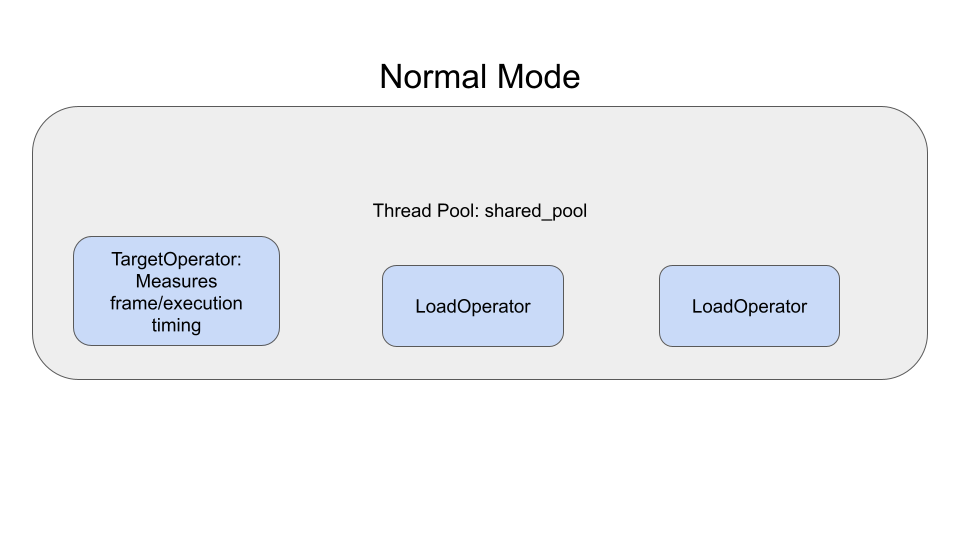
In normal scheduling, all operators compete equally for CPU resources, leading to timing variability and potential frame drops.
Real-time Scheduling Mode
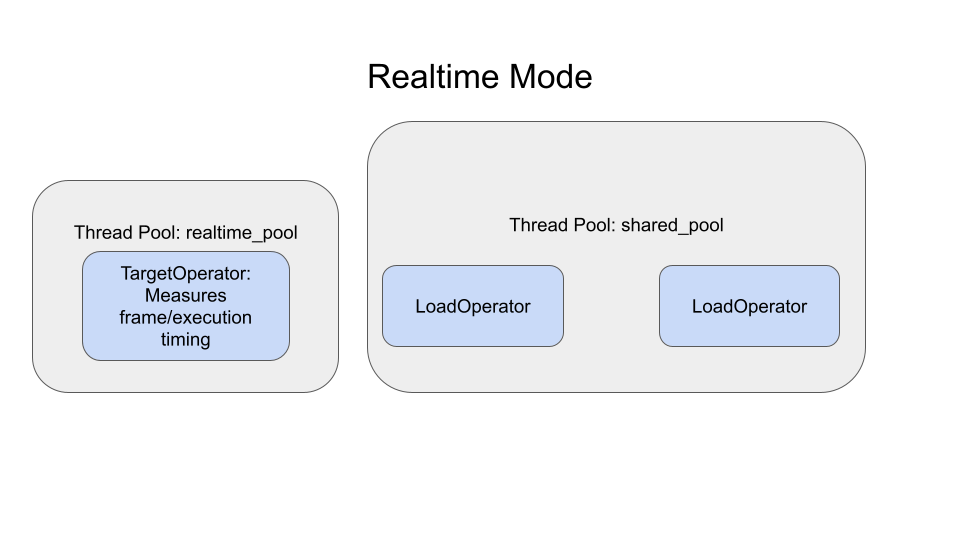
With real-time scheduling, the target operator gets priority access to CPU resources, resulting in more consistent timing and better frame rate stability.
Metrics
The benchmark measures and compares:
Performance Metrics
- Frame Period Statistics: Mean, standard deviation, min/max of frame periods
Timing Analysis
- Frame Period Consistency: How consistently the target FPS is maintained
- Standard Deviation Reduction: Improvement in timing variability with real-time scheduling
- Resource Contention Impact: How competing workloads affect timing
Requirements
System Requirements
- Linux system with real-time scheduling support
- Docker with privileged mode support
- Permission to run Docker containers with the
--privilegedflag - Multiple CPU cores recommended for meaningful contention testing
Docker Requirements
The benchmark requires running Docker in privileged mode to enable real-time scheduling:
- Required Docker flag:
--privileged - Required capabilities:
CAP_SYS_NICEandCAP_SYS_ADMIN(automatically provided by--privileged) - Volume mounting: Required to access generated plots on the host system
Without --privileged, you'll encounter "Operation not permitted" errors when trying to set real-time scheduling policies.
Understanding Results
Example Output
The benchmark generates comprehensive visualization plots to help analyze real-time scheduling performance:
Timing Distribution Analysis
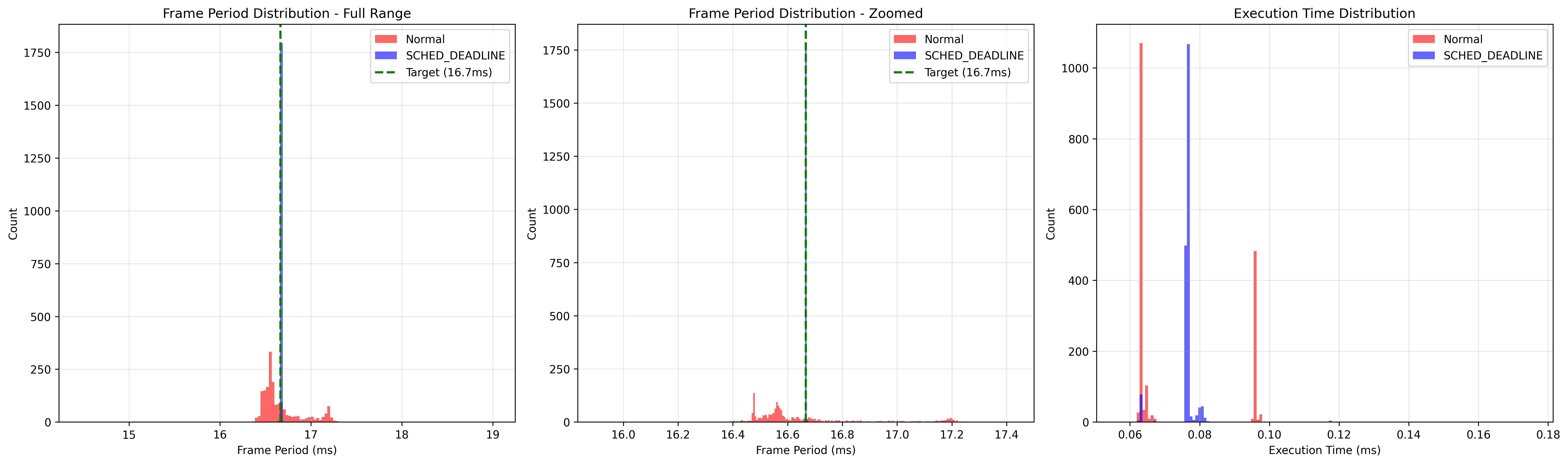
This plot shows the distribution of frame periods and execution times, comparing normal scheduling vs real-time scheduling. The histograms reveal:
- Frame Period Consistency: How tightly clustered the frame periods are around the target (16.67ms for 60 FPS)
- Execution Time Stability: The variability in operator execution times
- Scheduling Impact: Clear differences between normal and real-time scheduling policies
Timing Over Time Analysis
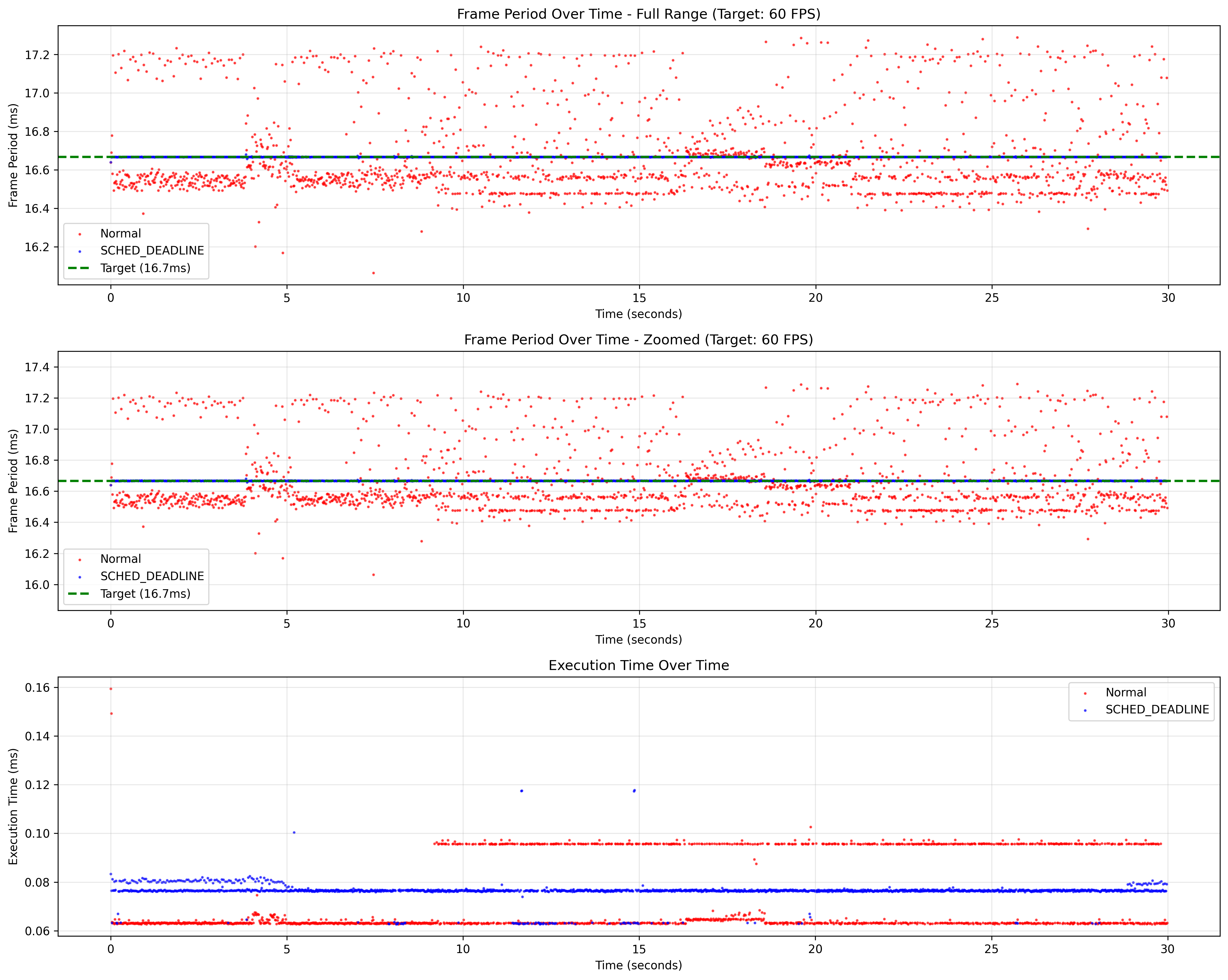
This time-series plot demonstrates timing behavior throughout the benchmark duration, showing:
- Frame Period Trends: How frame periods vary over time
- Execution Time Patterns: Temporal patterns in operator execution
- Real-time Benefits: Reduced standard deviation and more consistent timing with RT scheduling
Good Real-time Performance Indicators
- Frame Period Standard Deviation Reduction : Lower standard deviation in frame periods indicates more consistent timing
- Better handling of CPU contention under load
Example console output
================================================================================
Benchmark Configurations
================================================================================
  Target FPS: 60 (16.667 ms period)
  Duration: 30s
  Realtime: false
  Background Load Intensity: 1000
  Background Workload Size: 100
  Benchmark Load Intensity: 100
  Benchmark Workload Size: 100
  Worker Thread Number: 2
  Dummy Load Number: 2

================================================================================
Benchmark Results
================================================================================
=== Non-real-time Thread (Baseline) ===
Frame period std: 0.257 ms
Frame period mean: 16.667 ms
Frame period min/max: 16.120 ms / 17.218 ms

=== Real-time Thread ===
Frame period std: 0.013 ms
Frame period mean: 16.667 ms
Frame period min/max: 16.569 ms / 16.753 ms

================================================================================
Non-real-time and Real-time Thread Benchmark Comparison
================================================================================
Period std comparison:     0.26 ms →     0.01 ms  (+94.77%)

Raw measurement data written to: /tmp/benchmark_plots/realtime_thread_benchmark_results.json

Generating plots...

Timing plots saved to: /tmp/benchmark_plots
Generated plots:
  - timing_over_time.png (raw data points over time)
  - simple_histograms.png (distribution without overlays)
Troubleshooting
Real-time Scheduling Permission Errors
If you encounter errors like:
[error] [event_based_scheduler.cpp:984] Failed to set SCHED_DEADLINE policy with policy=6, runtime=1666666, deadline=15833332, period=16666666: Operation not permitted
[error] [event_based_scheduler.cpp:381] Failed to configure worker thread [pool name: realtime_pool, thread uid: 10]: GXF_FAILURE
Solutions:
- Ensure Docker privileged mode:
./holohub run realtime_threads_benchmarking --as-root \
  --docker-opts="--privileged -v /tmp/benchmark_plots:/tmp/benchmark_plots"
- Remove kernel real-time runtime limits (run on host system, not in container):
sudo sysctl -w kernel.sched_rt_runtime_us=-1
This removes the kernel limit on real-time task runtime, which is often required for SCHED_DEADLINE scheduling.
Note: The kernel parameter change persists until reboot.
Missing Plot Files
If benchmark plots are not accessible on the host system, ensure proper volume mounting:
- Plots are saved in the same directory as the JSON output file
- Default:
/tmp/benchmark_plots/(both JSON and plots) - Volume mount:
-v /tmp/benchmark_plots:/tmp/benchmark_plots - For custom locations: Mount the directory containing your
--outputfile path
Notes
- Real-time scheduling requires Docker
--privilegedmode and the application--as-rootflag - The benchmark automatically handles thread pool configuration and CPU pinning
- Detailed timing plots are automatically generated and saved to the specified directory
- Results may vary based on system load and hardware configuration
- For best results, run on a system with minimal background processes